
Every car buyer has heard the phrase “dealer invoice price” thrown around in a showroom, and every wholesale business has a stack of dealer invoices sitting in a filing cabinet. This guide explains what a dealer invoice actually is, shows the real dealer invoice format, and gives you a free generator plus two ready-to-use PDF templates so you can build one in minutes.
What Is a Dealer Invoice?
A dealer invoice is the paperwork that changes hands whenever a manufacturer, distributor, or supplier sells inventory to a dealer who will resell it. It works exactly like a normal invoice which includes seller details, buyer details, itemized goods, price, and tax with one difference: one side of the transaction is always a dealer, meaning a business that buys stock to sell it on, not to use it themselves.
The term shows up in two very different worlds, and it’s worth separating them clearly:
- Automotive sales – the price a car dealership was billed by the manufacturer for a vehicle, before holdbacks, incentives, or dealer add-ons. This is what most people searching for “dealer invoice” actually mean.
- General wholesale and B2B trade – the standard bill of sale a supplier issues to any retailer, distributor, or dealer buying goods in bulk, whether that’s electronics, furniture, or auto parts.
Both are legally the same type of document: proof that goods moved from a seller to a dealer at an agreed price. The rest of this guide covers both, starting with the one most people search for the car dealer invoice.
Car Dealer Invoice: What the Invoice Price Really Means
When you’re negotiating for a car, the salesperson may mention the “invoice price” as if it’s the dealership’s rock-bottom cost. It rarely is. Here’s what actually happens behind the scenes:
- Dealer invoice price is the amount the manufacturer billed the dealership for that specific car. The base vehicle cost plus factory-installed options and a destination/freight charge.
- Holdback is a percentage of the MSRP (often 1–3%) that the manufacturer pays back to the dealer after the car is sold. It’s built into the invoice but effectively lowers the dealer’s real cost.
- Dealer incentives and rebates are extra manufacturer payments, sometimes hidden from the public that reduce what the dealership actually paid, even though the invoice shows a higher number.
So the dealer invoice price is a real figure, but it is not the dealer’s true cost, and it’s rarely the number you should negotiate from. A dealer can sell “at invoice” or even slightly below it and still turn a profit once holdback and incentives are counted. Instead of anchoring to the invoice price, it’s usually smarter to research the fair market price for the trim and options you want, and collect competitive quotes from a few local dealerships before you commit.
Dealer Invoice vs Purchase Order – What’s the Difference?
This is one of the most common follow-up questions, so it’s worth a straight answer. A purchase order (PO) is created by the buyer before the sale, it’s a request that says “I want to buy these items, at this price, deliver by this date.” A dealer invoice is created by the seller after the order is fulfilled — it’s a bill that says “here’s what I actually delivered, and here’s what you owe me.”
| Purchase Order | Dealer Invoice | |
|---|---|---|
| Created by | The buyer (dealer) | The seller (manufacturer/supplier) |
| When | Before the goods ship | After the goods ship or the sale is confirmed |
| Purpose | Requests goods at agreed terms | Bills for goods actually delivered |
| Legal weight | An offer to buy | A demand for payment |
In practice, a completed sale often has both documents on file: the dealer’s purchase order requesting the stock, and the supplier’s dealer invoice confirming what was billed against it. If you regularly issue POs to suppliers, InvoPilot’s free Purchase Order Generator creates one in the same couple of minutes as the invoice tool below, and you can browse ready-made Purchase Order Templates if you’d rather start from a layout.
The Dealer Invoice Format, Field by Field
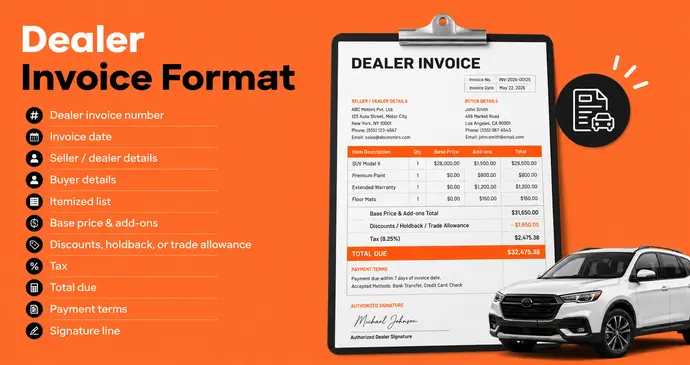
There’s no single legally fixed dealer invoice format, but a complete one always covers four blocks of information: who’s involved, what’s being sold, how much it costs, and a unique reference number to track it by. Here’s what a proper dealer invoice format includes:
- Dealer invoice number – a unique reference for every invoice; never reuse one, or your accounting and the buyer’s records will never match
- Invoice date – the date the invoice was issued
- Seller / dealer details – legal business name, address, and tax ID, GSTIN, or dealer license number
- Buyer details – name, address, and ID (driving license for a car sale, GSTIN for a business buyer)
- Itemized list – description, quantity, unit price for every item or the vehicle’s price components
- Base price & add-ons – for vehicles: base invoice price, options, destination charge; for goods: unit cost per SKU
- Discounts, holdback, or trade allowance – shown as a separate deduction, never folded into the base price
- Tax – sales tax, GST, or VAT, shown at the applicable rate
- Total due – the final, all-in number the buyer owes
- Payment terms – due on delivery, net 30, financed, etc.
- Signature line – for buyer acknowledgment on vehicle sales
Notice that add-ons, discounts, and tax are always kept on separate lines rather than folded into one number. That’s what makes an invoice audit-proof — anyone reading it later can see exactly how the total was built, line by line, instead of taking a single number on faith.
Free Dealer Invoice Generator
Rather than build this from scratch in a spreadsheet, fill in the fields below. Switch between the car dealership layout and the wholesale / B2B layout depending on what you’re invoicing, and the tool totals your subtotal, discounts, and tax automatically as you type.
Pick a template, fill in the details, and download a print-ready PDF. Free, no signup, no watermark, and nothing you type ever leaves your browser.
Dealer & Buyer
Invoice Details
Vehicle Information
Price Breakdown
| Description | Qty | Unit Price | Tax % |
|---|
Adjustments
INVOICE
| Description | Qty | Unit Price | Tax | Amount |
|---|