You know that feeling when you’ve just landed your first big client, and suddenly you realize – crap, I need to send a professional invoice? Yeah, I’ve been there. Standing in my cramped home office at 11 PM, frantically googling “how to make an invoice look professional” because I couldn’t afford QuickBooks yet.
That was three years ago. Since then, I’ve helped my neighbor set up his landscaping business billing, watched my sister struggle with her freelance graphic design invoices, and even consulted for a local bakery that was literally writing invoices by hand (yes, really, in 2024).
Here’s what nobody tells you about choosing between free invoice templates and paid software: it’s not about picking the “best” option. It’s about picking what actually works for where your business is right now, not where you think it should be.
Why This Even Matters (More Than You Think)
Let me paint you a picture. My friend Jake runs a small HVAC repair business. Smart guy, great technician, but his invoicing was a disaster. He’d finish a job, get home, and spend forty-five minutes creating an invoice in Word. Sometimes he’d forget altogether and lose money because he felt awkward asking for payment weeks later.
Sound familiar?
Here’s the thing – bad invoicing doesn’t just cost you time. It costs you respect, money, and sleep. When invoices look unprofessional or arrive late, clients assume you’re disorganized. When they assume you’re disorganized, they pay you slower. When they pay slower, you stress about cash flow — and some businesses even turn to invoice financing just to survive the gaps caused by late payments.
The National Federation of Independent Business released some pretty scary numbers last year. Almost half of small businesses deal with cash flow problems directly tied to crappy invoicing — a trend backed by broader invoice statistics that reveal just how widespread billing inefficiency really is. Not economic downturns or lack of customers – just basic billing problems.
But here’s the encouraging part: fixing your invoicing process is probably easier than you think. Whether you go free or paid, the improvement is usually dramatic once you get consistent about it.
Free Templates: The Real Story (From Someone Who’s Actually Used Them)
What We’re Really Talking About Here
When people say “free invoice templates,” they usually mean one of four things:
Those basic Word or Google Docs templates you download and customize. Simple, static, but they work if you’re disciplined about it.
Excel spreadsheets with formulas built in. These are actually pretty clever – someone’s already done the math for you, and you can track multiple clients in one place.
Online generators like InvoPilot that create professional PDFs without making you sign up for anything. These have gotten really sophisticated lately.
Industry-specific templates designed for contractors, freelancers, consultants, whatever. Usually created by someone who actually works in that field.
The Stuff That Actually Works Well
I’m not going to lie to you – free templates can look absolutely professional. My sister’s design business started with a free template she found on some government small business website. She customized it with her colors and fonts, and her invoices looked better than invoices I was getting from $50-million companies.
The control aspect is huge too. When you own the template, you own the process. No worrying about software companies changing features, raising prices, or going out of business. Your invoice system lives on your computer, period.
And let’s be honest about money – when you’re starting out, every $30 monthly subscription hurts. I remember calculating that QuickBooks would cost me more than I made some months. Free templates let you look professional while you’re building revenue.
Where Things Get Messy (And They Will)
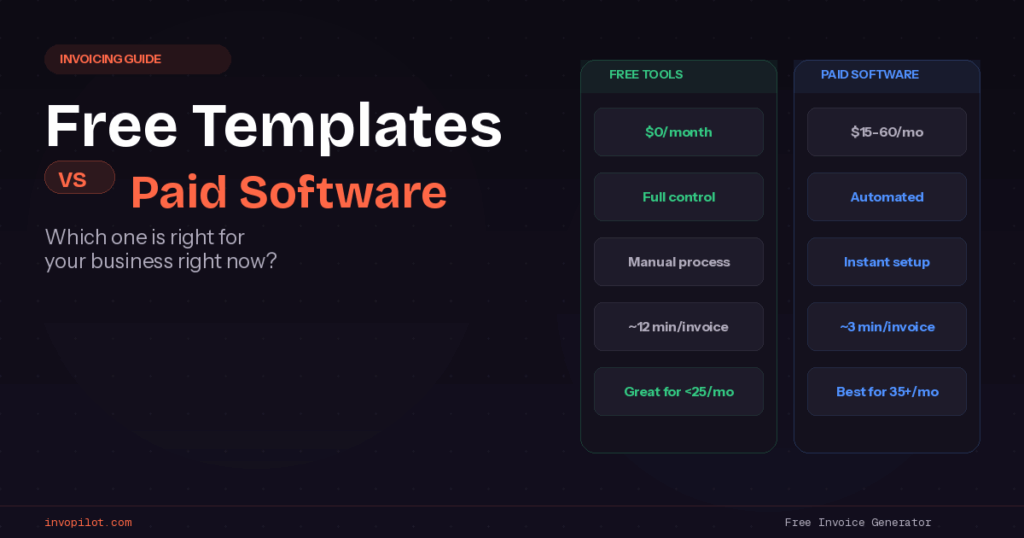
But man, the time thing becomes real pretty quickly. I timed myself once creating invoices with a Word template versus using paid software. Fifteen minutes per invoice with the template, three minutes with software. Doesn’t sound like much until you’re doing twenty invoices and losing five hours of your life every month.
The calculation errors are brutal too. I made a $400 mistake once because I copy-pasted the wrong subtotal. Had to eat the cost because calling the client to ask for more money would’ve been mortifying.
Here’s something else nobody warns you about – invoice numbering becomes this weird stress point. You’re manually tracking numbers, making sure nothing’s duplicated, wondering if you skipped one somewhere. It’s such a small thing that becomes this constant nagging worry.
And scaling? Forget about it. There’s this invisible wall around twenty-five invoices per month where the manual process just breaks your brain. You start dreading billing day instead of celebrating money coming in.
When Free Actually Makes Sense
Look, I’m not anti-free templates. They work brilliantly in specific situations:
If you’re sending maybe ten invoices per month, have straightforward pricing, and actually enjoy the process of customizing each invoice, free templates are perfect. Some people find the manual process meditative, believe it or not.
When cash flow is genuinely tight and you need to preserve every dollar for marketing or inventory, free makes total sense. Better to invoice for free than not invoice at all because you can’t afford software.
If you’re the type of person who likes complete control over everything – and I mean everything – free templates give you that. You can adjust every pixel, change anything you want, never worry about software limitations.
The Paid Software Universe (And Why It’s Confusing)
How Much Are We Actually Talking About?
The pricing landscape is all over the place. You’ve got basic tools starting around eight bucks monthly, mid-range stuff in the thirty to sixty dollar range, and enterprise solutions that’ll cost you more than your car payment.
What gets tricky is figuring out what you actually need versus what sounds impressive in marketing copy. I’ve seen businesses paying for comprehensive project management suites when they literally just need to send invoices.
FreshBooks starts around fifteen dollars monthly but gets expensive fast if you need multiple users. QuickBooks is powerful but feels like operating a spaceship if you just want basic invoicing. Wave is free for basic stuff but charges for everything useful. Check Out Quickbooks Alternatives
Then you’ve got newer players trying to undercut everyone with simpler, cheaper tools. Some are great, others disappear after six months leaving you scrambling.
What You Get When You Pay Up
The automation thing is genuinely life-changing once you experience it. Invoice numbers increment automatically, taxes calculate themselves, payment reminders send without you thinking about it. It’s like having an administrative assistant who never takes vacation.
I watched Jake (remember the HVAC guy?) switch to FreshBooks and his whole stress level changed. Instead of dreading invoicing day, he’d knock out a week’s worth of invoices during his lunch break. The time savings paid for the software within the first month.
The professional client experience matters more than you might think too. When clients can click a link and pay immediately, they do. When they have to mail checks or remember to transfer money, they don’t. Online payment options alone often justify the software cost through faster payments.
Reporting becomes actually useful instead of theoretical. You start seeing patterns – which clients pay fast, which ones always go thirty days, whether raising prices affects payment speed. Data you never had with manual processes.
The Dark Side Nobody Mentions
Here’s what software companies don’t advertise: feature overwhelm is real. You sign up for invoicing and suddenly you’re drowning in project management tools, time tracking, expense reporting, inventory management – none of which you needed.
The learning curve isn’t trivial either. Budget at least a weekend to set everything up properly, customize templates, import contacts, figure out integrations. It’s not plug-and-play despite what the marketing says.
Monthly fees add up faster than you expect. That twenty-dollar monthly subscription becomes $240 annually, $1,200 over five years. For something you used to do for free. Sometimes that math works out, sometimes it doesn’t.
And here’s a fun one – you become dependent on their business decisions. When they raise prices, change features, or get acquired by a company you hate, you’re stuck unless you want to go through the pain of switching everything.
The Middle Ground That Most People Miss
Here’s where things get interesting, and why I started with that story about my late-night invoice panic. Between clunky Word templates and expensive monthly subscriptions, there’s this whole category of tools that most small businesses never consider.
Modern Free Generators Change Everything
Tools like InvoPilot represent this sweet spot that didn’t really exist a few years ago. You get professional results without ongoing costs, automation where it matters most, but without the complexity of comprehensive business software.
The difference is focus. Instead of trying to manage your entire business, these tools do one thing really well – create professional invoices quickly and easily. No account setup, no monthly fees, no feature bloat.
I started recommending InvoPilot to people after my cousin Sarah tried it for her consulting business. She needed something more polished than Word templates but couldn’t justify forty dollars monthly for software she’d barely use. InvoPilot gave her exactly what she needed – professional invoices with live preview, multi-currency support for her international clients, instant PDF downloads.
Real Example: How Sarah Saved $480 and Got Better Results
Sarah was paying FreshBooks forty dollars monthly mostly for basic invoicing. Great software, but she used maybe twenty percent of the features. The project management stuff sat unused, the time tracking was overkill for her consulting work, the team collaboration features were pointless for a solo business.
She switched to InvoPilot and immediately saved $480 annually. But here’s the kicker – her invoicing process actually got faster because she wasn’t navigating through features she didn’t need. Simple interface, professional results, zero monthly pressure.
That saved money went into a professional development course that expanded her service offerings. Direct return on making a smarter tool choice.
Why This Approach Works So Well
Focus matters more than features. When a tool does one thing excellently instead of many things adequately, the user experience gets dramatically better.
No commitment pressure changes how you think about invoicing. You’re not trying to justify a monthly expense, so you can focus on creating great invoices instead of maximizing software ROI.
Professional results without professional complexity. You get the polished output without learning comprehensive software or paying ongoing fees.
Let’s Talk Real Numbers (Because This Stuff Matters)
Time Investment Reality Check
I tracked this stuff obsessively for about six months, timing different approaches:
Basic Word templates: twelve to eighteen minutes per invoice, depending on complexity Excel with formulas: eight to ten minutes per invoice Free online generators: four to six minutes per invoice
Paid software: three to five minutes per invoice (after initial setup)
So at twenty invoices monthly, you’re looking at four to six hours with templates, maybe ninety minutes with modern free tools, about an hour with paid software.
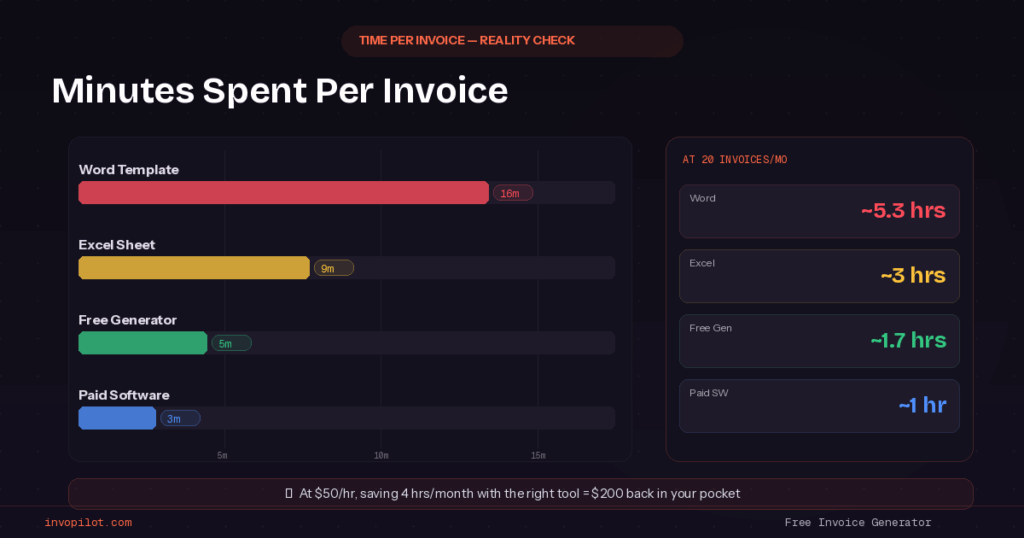
If your time is worth fifty bucks an hour (and it probably should be), that’s the difference between $300 monthly in time costs versus $50. Suddenly software subscriptions look different.
The Real Cost Analysis Everyone Skips
Let’s get specific because this is where businesses make expensive mistakes:
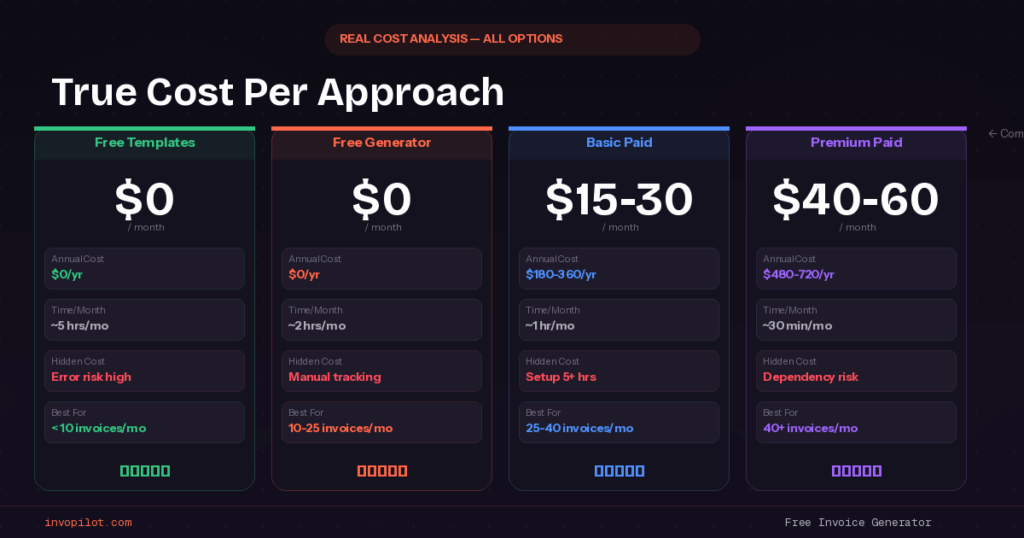
Free templates cost zero dollars but significant time investment. Plus the hidden costs of errors, inconsistency, and the stress of manual processes.
Modern free generators cost zero ongoing dollars, minimal time investment, but you’re still handling payment tracking and client follow-up manually.
Basic paid software runs $15-30 monthly plus setup time, but automates most repetitive tasks and reduces error risks.
Premium software costs $40-60 monthly plus significant setup investment, but handles everything including payment processing and advanced reporting.
The break-even calculation depends entirely on your invoice volume and time value. For some businesses, free makes perfect sense. For others, paid software pays for itself in the first month.
Hidden Costs That Blindside People
Setup time for paid software isn’t trivial. Budget at least five hours to do it right – customizing templates, importing data, configuring integrations, learning the interface. At $50 hourly, that’s $250 in time investment before you send invoice number one.
Integration complexity often requires additional subscriptions or setup fees. Connecting your invoicing tool to your accounting software might need Zapier at fifteen dollars monthly.
Payment processing fees add up if you use integrated payment options. Two-point-nine percent doesn’t sound like much until you’re processing $10,000 monthly in invoices.
Migration costs bite you if you ever want to switch platforms. Data export fees, time to rebuild templates, retraining yourself or staff on new software.
Industry-Specific Reality Check
Solo Freelancers and Consultants
Most successful freelancers I know follow this pattern: start with free tools until you hit consistent monthly revenue, then evaluate based on time savings versus software costs.
The break-even point usually happens around twenty-five to thirty invoices monthly, but it depends on your billing complexity and how much you value automation.
Writers, designers, and other creative freelancers often stick with free tools longer because their billing is usually straightforward. Project-based consultants tend to upgrade sooner because they need more detailed invoicing capabilities — including the ability to create a proper itemized invoice that breaks down every deliverable clearly.
Service Businesses with Employees
Once you have employees, invoice consistency becomes more important because multiple people might be handling billing. Free templates work fine if one person owns the entire process, but become problematic with multiple users.
My friend’s cleaning business hit this wall when they hired their second employee. Suddenly invoice formatting varied depending on who created it, information got inconsistent, and client complaints started rolling in.
They switched to paid software not for automation but for standardization. Everyone uses the same templates, same numbering system, same formatting. Worth the monthly cost to avoid client confusion.
Product-Based Businesses
Retail and product businesses usually need more sophisticated invoicing because of inventory tracking, varying pricing, sales tax complications across different states or countries.
These businesses often benefit from integrated solutions that handle both invoicing and inventory management, even if the monthly cost is higher. The alternative – managing product data separately from invoicing – creates too many opportunities for errors.
Creative Agencies and Design Firms
Creative businesses often care more about invoice design than other industries. Your invoice is a reflection of your design skills, so it better look amazing.
This can make free templates particularly attractive because you get unlimited customization without ongoing costs. I know a design agency that spent weeks creating the perfect invoice template and refuses to use software because nothing matches their vision.
But high invoice volume often pushes creative agencies toward paid solutions despite design limitations. When you’re sending sixty invoices monthly, time savings trumps perfect aesthetics.
Decision Framework That Actually Works
Questions That Matter More Than Features Lists
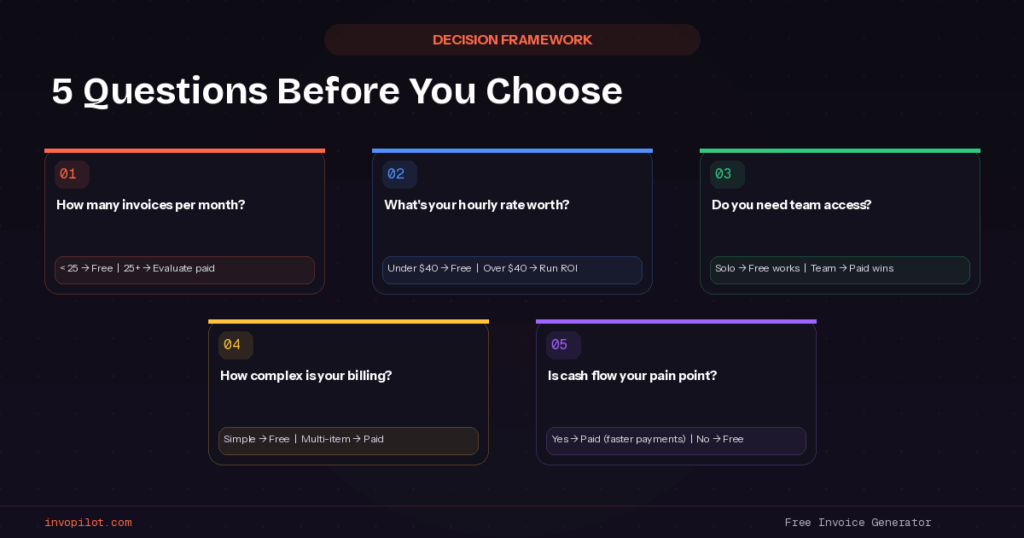
Before getting seduced by software demos or free template collections, figure out these basic questions:
How many invoices do you actually send per month, and is that number growing consistently? Be honest – it’s probably fewer than you think.
What’s your effective hourly rate, and how much time do you spend on invoicing tasks? Include everything – creating invoices, tracking payments, following up on late payments, fixing errors.
Do you genuinely need advanced features, or do they just sound impressive? Things like project management integration, time tracking, multi-user access, advanced reporting.
How important is cash flow optimization versus software cost optimization? Faster payments from professional invoicing might justify higher software costs.
What’s your actual pain point – time consumption, professional appearance, payment tracking, or something else entirely?
Smart Progression Strategy
Instead of trying to pick the perfect long-term solution, consider this progression that works for most businesses:
Start with modern free tools like InvoPilot while you establish consistent billing processes and understand your real needs. Give this approach at least six months.
Track everything – time spent invoicing, payment speed, error rates, frustration levels. You need real data to make smart upgrade decisions.
Evaluate paid options only when free tools become genuine limitations, not when they seem less impressive than what competitors use.
Make upgrade decisions based on ROI calculations, not feature envy or what business magazines recommend.
Red Flags That Signal It’s Time to Upgrade
When invoicing starts taking more than two hours weekly for a solo business, or more than four hours for a small team, you’re probably ready for automation.
If you’re making calculation errors regularly, missing invoice numbers, or sending inconsistent formatting, paid software’s standardization becomes valuable.
When clients start complaining about payment process complexity or you’re losing money to slow payments, integrated payment processing justifies software costs.
If you find yourself avoiding invoicing because the process feels overwhelming, any solution that makes it easier pays for itself in reduced stress.
Advanced Strategies for Any Solution
Making Free Tools Work Better
Document your entire invoicing process step-by-step. Seriously, write it down like you’re training someone else to do it. This eliminates decision fatigue and ensures consistency.
Create templates for common invoice descriptions, payment terms, and client notes. Even with free tools, you can eliminate repetitive typing through smart preparation.
Use your phone’s timer to track invoicing time monthly. You need actual data to make smart decisions about whether time investment justifies software costs.
Set up simple spreadsheets to track payment status, client history, and invoice performance. Free tools don’t include this, but you can build it yourself pretty easily.
Maximizing Paid Software Value
Actually use the reporting features. Most people pay for analytics they never look at. Monthly review of payment patterns, client performance, and revenue trends makes the software worthwhile.
Customize templates thoroughly during setup. Don’t accept default designs that look like everyone else’s invoices. Professional appearance justifies software costs.
Integrate with other tools you actually use. If software doesn’t connect with your existing workflow, you’re not getting full value from the subscription.
Train yourself properly on advanced features instead of sticking to basic functionality. Otherwise you’re paying premium prices for basic results.
Optimization Tips for Both Approaches
Standardize everything – invoice numbering, invoice payment terms, client communication templates, follow-up schedules. Consistency improves client experience and reduces your mental overhead.
Set up monthly invoicing reviews to catch problems early. Look for patterns in late payments, client feedback, calculation errors, or process bottlenecks.
Create backup processes in case your primary system fails. Whether free or paid, you need contingency plans for technology problems.
Document client preferences for invoicing delivery, payment methods, and communication frequency. This information becomes valuable regardless of what tools you use.
Future-Proofing Your Invoicing Approach
Technology Trends Worth Watching
Mobile-first design is becoming standard even for free tools. Make sure whatever you choose works well on phones and tablets since more business happens mobile-first. This shift also ties into the broader move toward electronic invoicing, which is quickly becoming the global standard for modern businesses.
AI integration is starting to appear in invoicing tools – automatic data entry, smart payment predictions, client behavior analysis. Even free tools are experimenting with these features.
Security improvements are accelerating across all price points due to increasing cyber threats. Don’t assume expensive software is automatically more secure than free alternatives.
Integration ecosystems continue expanding. The ability to connect invoicing with other business tools is becoming standard rather than premium.
Preparing for Business Growth
Think about how your chosen solution handles 3x your current invoice volume. What works for ten invoices monthly might crash and burn at thirty.
Consider team collaboration needs even if you’re currently solo. How would additional employees access and use your invoicing system?
Plan for international growth if it’s remotely possible. Multi-currency support and international payment options become critical for global businesses.
Ensure data portability so you can switch systems if needed. Whether free or paid, you should be able to export invoice history and client information.
Common Mistakes That Cost Money and Sanity
Mistake 1: Choosing Based on Price Instead of Value
I see businesses choose the cheapest option without calculating total costs including time investment. Sometimes free costs more than paid when you factor in hours spent.
Smart approach: Calculate your total cost including time value, error rates, and growth limitations. The cheapest option often isn’t the most economical.
Mistake 2: Over-Engineering from Day One
New businesses often invest in comprehensive solutions they won’t need for years, if ever. Feature lists sound impressive but don’t necessarily improve results.
Better approach: Start simple and upgrade based on actual limitations, not projected needs or competitor envy.
Mistake #: Ignoring Client Impact
Focusing entirely on internal efficiency while ignoring how invoicing choices affect client relationships and payment behavior.
Client perspective matters: Professional appearance and easy payment options often improve cash flow more than internal automation features.
Mistake 4: Not Planning for Reasonable Growth
Choosing solutions that work perfectly today but require complete replacement within twelve months due to growth limitations.
Growth planning: Select tools that handle reasonable expansion without major disruption, but don’t over-engineer for unlikely scenarios.
Mistake 5: Failing to Track Results
Not monitoring how invoicing choices affect payment speed, time investment, error rates, and overall business performance.
Measurement approach: Establish baseline metrics and track changes over time. Data-driven decisions beat feature comparisons.
My Practical Recommendations by Business Size
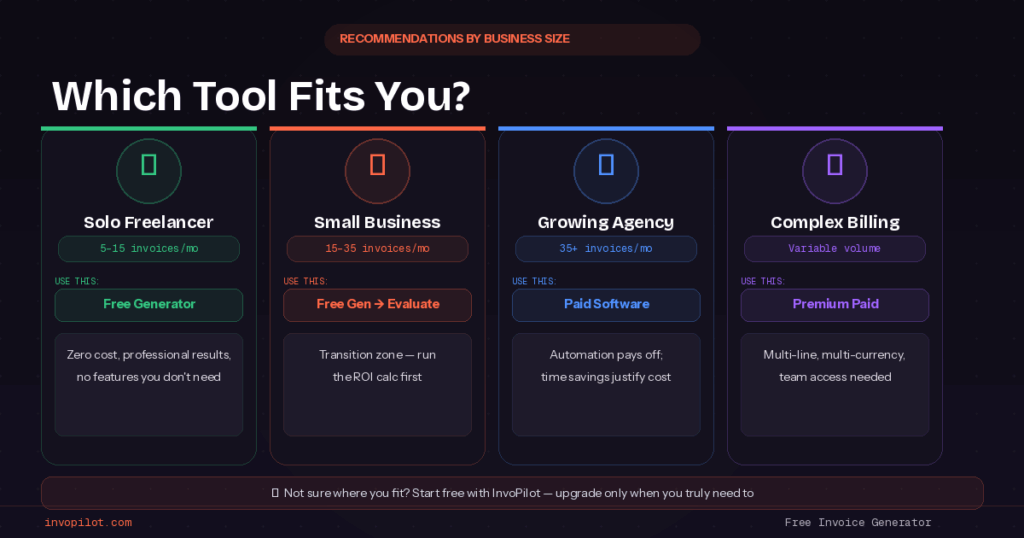
Solo Freelancers (5-15 invoices monthly)
Start with InvoPilot or similar modern free generators. Professional results without ongoing costs, perfect for establishing good billing habits while preserving cash flow.
Small Service Businesses (15-35 invoices monthly)
Evaluate both free generators and basic paid solutions based on time value calculations. This is the transition zone where either approach can work.
Growing Agencies (35+ invoices monthly)
Seriously consider paid solutions with automation features. Volume usually justifies subscription costs through time savings and reduced error rates.
Complex Service Providers (variable volume, complicated billing)
Paid solutions with customization capabilities usually provide the best ROI due to billing complexity regardless of volume.
Bottom Line: What I’d Do Starting Over
If I were launching a business tomorrow, here’s my exact approach:
Start with InvoPilot or similar modern free generator for the first six months. Focus on establishing consistent billing processes and understanding actual needs rather than projected requirements.
Track time spent invoicing, payment patterns, and any process frustrations religiously. You need real data to make smart decisions about upgrades.
Evaluate paid options when free tools become genuine limitations – probably around thirty invoices monthly or when automation would save significant time.
Make the switch based on ROI calculations rather than feature envy or what other businesses use.
The goal isn’t impressive invoicing software. The goal is getting paid efficiently while maintaining professional client relationships. Sometimes that requires expensive tools. Often it doesn’t.
Most importantly, don’t stress about making the perfect choice. Start with something that works for your current situation and evolve based on real experience rather than theoretical concerns.
Ready to create professional invoices without monthly fees or complicated setup? Try InvoPilot’s free invoice generator and see how quickly you can streamline your billing process. No signup required, no commitment pressure – just professional results when you need them.
Questions People Actually Ask
When should I upgrade from free to paid invoicing tools?
When you’re consistently spending more than 3 hours weekly on invoicing, sending 25+ invoices monthly, or when manual processes start affecting client relationships. The exact number varies by business type and time value.
Do free invoice templates look professional enough for big clients?
Absolutely. Professional appearance depends on design quality and consistency, not software cost. Modern free generators create invoices indistinguishable from expensive software output.
What’s the biggest risk of using free invoicing solutions?
Time consumption as you scale. Free solutions require more manual management, which becomes problematic at higher volumes. The break-even point is usually around 25-30 monthly invoices.
Can I switch from free to paid without losing invoice history?
Yes, though the transition process varies. Most businesses keep PDF copies of past invoices regardless of creation method, ensuring continuity when switching systems.
How do I know if paid software is worth the cost?
Calculate time savings in dollars. If software saves 2 hours weekly and your time is worth $50 hourly, that’s $400 monthly in time value versus maybe $30 in software costs. Easy decision.
What’s worked for your business – free templates, paid software, or something in between? Drop a comment sharing your experience. Other business owners would love to hear real stories about what actually works in practice.
Create Invoices Instantly – Free & Easy!
Generate professional invoices in seconds with our Free Online Invoice Generator.
👉 Invoice Generator