Every business that buys goods or services from a vendor faces the same operational reality: invoices need to be processed. Received, checked, approved, paid, and recorded — accurately, compliantly, and on time. For a business handling a handful of invoices a month, that might sound straightforward. For a growing company processing hundreds or thousands of vendor bills across multiple departments, it quickly becomes one of the most time-consuming and error-prone workflows in the entire finance function.
The stakes are real. A single misplaced invoice can delay payment and damage a supplier relationship built over years. A duplicate payment that slips through the cracks costs real money. An approval chain that stalls because the right person is unreachable holds up the entire payable cycle. And when auditors come asking for documentation, a disorganized invoice trail creates serious compliance headaches.
According to data from InvoPilot’s invoice statistics research, the average business processes around 500 invoices per month — and 86% of SMEs still enter invoice data manually. With 61% of late payments traced back to incorrect invoices, the link between poor invoice processing and cash flow problems is direct and well-documented.
This guide covers everything you need to know about invoice processing: what it is, how the cycle works, the challenges teams face, the benefits of automation, and how to choose the right tools to fix it. Whether you are a finance professional optimizing your AP workflow or a business owner trying to understand why payments are always running late, this is your complete reference.
What Is Invoice Processing?
Invoice processing is a core business function performed by the accounts payable (AP) department. It refers to the complete series of steps involved in managing vendor or supplier invoices — from the moment an invoice is received all the way through to payment and final recording in the company’s general ledger.
In simpler terms: when your business owes money to a supplier, invoice processing is how that bill gets verified, approved, paid, and filed — correctly and on time.
Businesses handle hundreds or thousands of invoices each month. Without a structured, reliable process, payments get delayed, errors multiply, vendors become frustrated, and audits become nightmares. That’s exactly why invoice processing — and increasingly, automated invoice processing — is a top priority for finance teams.
It is worth distinguishing invoice processing (the AP-side workflow of paying vendors) from the invoice-to-cash process, which covers the AR-side workflow of issuing invoices and collecting payment from your own customers. Both are critical to financial health, but they operate in opposite directions of the cash cycle.
Why Does Invoice Processing Matter?
A streamlined invoice processing workflow directly affects:
- Cash flow visibility — knowing what you owe and when
- Vendor relationships — paying on time builds trust and may unlock early-payment discounts
- Compliance and audit readiness — a clear, documented trail for every payment
- Operational efficiency — freeing AP teams from repetitive, manual tasks
- Financial accuracy — reducing errors that lead to overpayments, duplicate payments, or fraud
According to industry benchmarks, organisations that rely on manual invoice processing spend significantly more per invoice than those using automation — and take far longer to process each one. Clear invoice payment terms and conditions and a structured processing workflow together form the foundation of a healthy accounts payable function.
The 5 Key Steps in the Invoice Processing Cycle
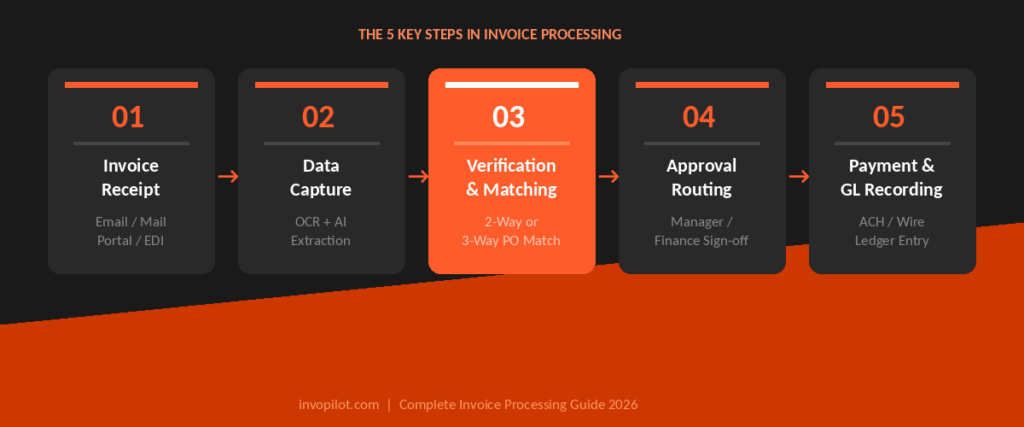
Step 1: Invoice Receipt
Invoices arrive through multiple channels — email, postal mail, supplier portals, or EDI (Electronic Data Interchange). They may come as PDFs, scanned paper documents, or structured e-invoice formats. Vendors may also issue proforma invoices before the final commercial invoice is raised, particularly in international trade — understanding the difference between proforma and commercial invoice helps AP teams handle the receipt stage correctly.
The first challenge is centralising all inbound invoices into one consistent intake pipeline.
Best practice: Establish a dedicated AP email address or supplier portal so all invoices land in one place, reducing the risk of misplaced or overlooked invoices.
Step 2: Data Capture and Digitisation
Once an invoice is received, the relevant data needs to be extracted and digitised. This includes:
- Supplier name and contact details
- Invoice number and date
- Line items, quantities, and unit prices
- Total amount due and applicable taxes
- Payment terms and due date
In manual workflows, AP staff key this data in by hand — a slow and error-prone process. Modern solutions use OCR (Optical Character Recognition) and AI-powered data extraction to capture this information automatically, even from unstructured formats.
To create properly structured invoices on the sending side, InvoPilot’s free online invoice generator makes it easy to generate PDF invoices with all required fields — reducing the likelihood of data capture errors downstream.
Step 3: Verification and Matching
This is where accuracy is validated. The invoice is checked against:
- Purchase Order (PO): Does the invoice match what was ordered?
- Goods Receipt: Was the delivery actually received and accepted?
- Supplier Master Data: Is this a legitimate, approved vendor?
When all three documents align, this is called 3-way matching (PO + receipt + invoice). If only the PO and invoice are checked, it’s 2-way matching. Any discrepancies — wrong quantities, incorrect pricing, missing PO numbers — must be resolved before the invoice can proceed.
Strong vendor invoice management practices at this stage — including maintaining clean supplier master data and standardised invoice formats — significantly reduce exception rates.
Step 4: Approval Routing
Verified invoices are sent to the relevant authorised approvers within the organisation. Depending on company structure and invoice value, this may involve:
- A department manager approving their cost centre’s spend
- A finance director signing off on high-value invoices
- Multiple stakeholders in a sequential or parallel approval chain
Manual approval chains — via email or paper — create significant delays. Automated approval routing assigns the right approver instantly, sends reminders for overdue decisions, and provides real-time visibility into where an invoice sits in the queue.
Step 5: Payment and General Ledger Recording
Once approved, the invoice is scheduled for payment. Common payment methods include:
- ACH (Automated Clearing House) bank transfers
- Wire transfers for international suppliers
- Cheques (increasingly rare)
- Virtual cards or digital wallets
After payment is processed, the transaction is posted to the general ledger under the appropriate expense category. This final step ensures accurate financial reporting and supports clean, auditable books. For businesses looking to unlock working capital from outstanding invoices, invoice financing options can also be explored at this stage to bridge cash flow gaps between approval and payment.
Invoice Processing Flowchart
Invoice Received (Email / Mail / EDI / Portal)
↓
Data Capture & Digitisation (OCR / Manual Entry)
↓
Verification & Matching (2-way or 3-way PO Match)
↓
Exception? ──YES──→ Resolve Discrepancy ──→ Re-verify
↓ NO
Approval Routing (Department / Finance Signoff)
↓
Rejected? ──YES──→ Return to Supplier / Query
↓ NO
Payment Scheduling (ACH / Wire / Cheque)
↓
General Ledger Recording & Archiving
Manual vs. Automated Invoice Processing
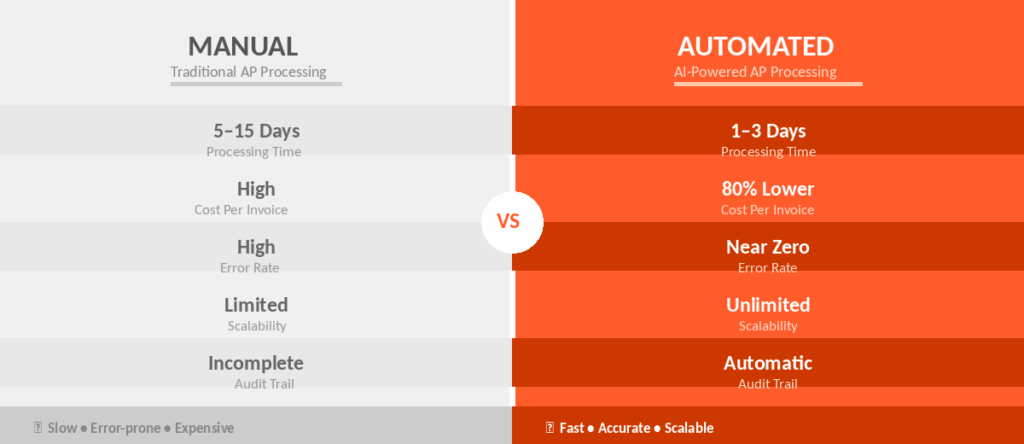
| Factor | Manual Processing | Automated Processing |
|---|---|---|
| Data entry | Human keying — slow, error-prone | AI/OCR extraction — fast and accurate |
| Processing time | Days to weeks | Hours to days |
| Cost per invoice | High (labour-intensive) | Significantly lower |
| Error rate | High | Near-zero |
| Approval tracking | Difficult (email chains) | Real-time visibility |
| Audit trail | Inconsistent | Complete and automatic |
| Scalability | Limited by headcount | Scales with volume |
| Early payment discounts | Often missed | Captured systematically |
Manual processing was the norm for decades — but with invoice volumes growing and finance teams stretched thin, the shift to automated invoice processing is no longer optional for competitive businesses. As highlighted in InvoPilot’s invoice statistics overview, only 5% of AP teams have fully automated their invoice and payment processes — representing a significant efficiency gap across most organisations.
Common Challenges in Invoice Processing
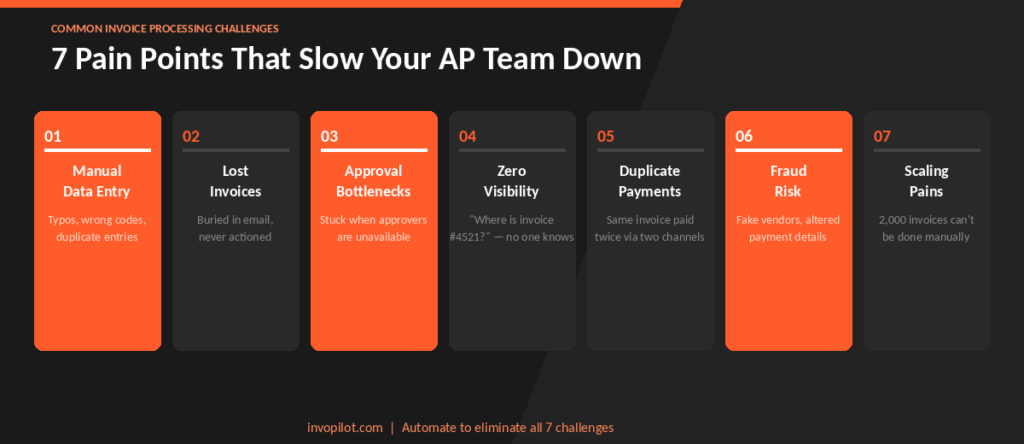
1. Manual Data Entry Errors
Typing invoice data by hand introduces mistakes — transposed numbers, wrong vendor codes, incorrect GL coding. These errors can lead to overpayments, duplicate payments, or compliance issues that take time and effort to correct.
2. Lost or Misplaced Invoices
In paper-heavy or email-scattered environments, invoices get buried, lost, or simply forgotten. The result: late payments, penalty fees, and strained supplier relationships.
3. Approval Bottlenecks
When approvals depend on a specific person who is travelling, ill, or simply overwhelmed, invoices sit idle. Without automated escalation and reminders, payment cycles stretch out unnecessarily.
4. Lack of Visibility
Finance teams often cannot answer simple questions — “Where is invoice #4521?” — without manually checking multiple systems or chasing colleagues. This opacity makes cash flow forecasting unreliable.
5. Duplicate Payments
Without robust duplicate detection, the same invoice can be entered and paid twice — particularly common when invoices arrive via multiple channels (email and post, for instance).
6. Compliance and Fraud Risk
Invoices from fraudulent vendors, altered payment details (“mandate fraud”), or unapproved suppliers can slip through if there are no automated controls. Regulatory compliance — especially around tax documentation and audit trails — also becomes harder without a structured system. Clear invoice payment terms documented on every invoice help reduce disputes and compliance ambiguity.
7. Scaling Pains
As businesses grow, invoice volumes grow too. A team that handled 200 invoices per month manually will struggle when volumes reach 2,000. Without automation, growth requires proportional headcount increases.
Benefits of Automated Invoice Processing
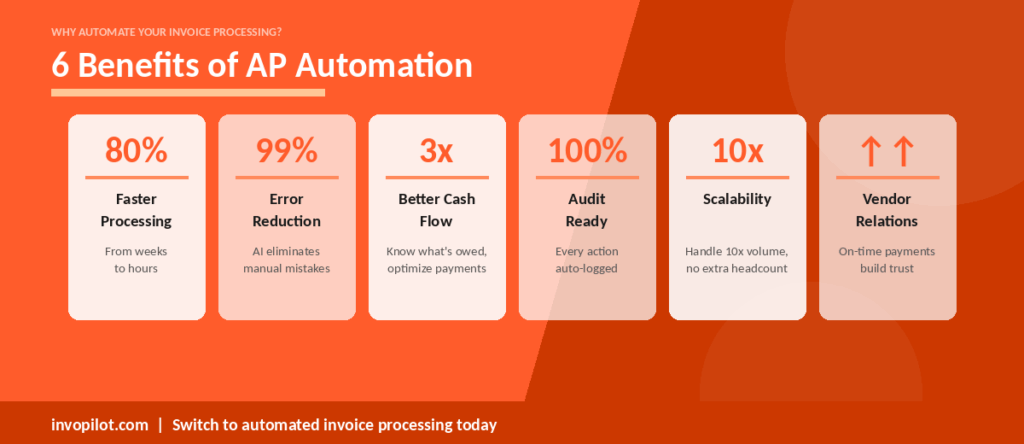
Faster Processing Cycles
Automation reduces invoice processing time from weeks to days — or even hours. AP teams spend less time on data entry and chasing approvals, and more time on value-added analysis.
Reduced Errors and Rework
AI-powered data capture and automatic matching virtually eliminate manual entry errors. Exceptions are flagged immediately, rather than discovered weeks later during reconciliation.
Better Cash Flow Management
When you know exactly what’s owed and when, you can make smarter payment decisions — prioritising early-payment discounts where beneficial, and timing payments to optimise working capital. This directly strengthens the broader invoice-to-cash process, giving finance leaders accurate, real-time visibility into both what is owed and what is outstanding.
Stronger Vendor Relationships
Vendors notice when they are paid accurately and on time. Reliable payment practices build trust, open doors to preferential terms, and reduce supplier-side friction. Robust vendor invoice management processes are consistently cited as one of the biggest differentiators between high-performing AP teams and those struggling with supplier escalations.
Improved Compliance and Audit Readiness
Every invoice, approval decision, and payment is logged automatically with timestamps and user records. When auditors or regulators come calling, everything is searchable and complete.
Scalable Without Extra Headcount
With automated invoice processing, your AP function can handle 10× the volume without hiring proportionally. The system scales; your team focuses on exceptions and strategy.
How to Choose Invoice Processing Software
When evaluating invoice processing tools, consider:
1. Data Capture Quality
Can the software accurately extract data from your invoice formats — PDFs, scanned documents, EDI files, and structured e-invoices?
2. ERP and Accounting System Integration
The tool must connect with your existing systems (QuickBooks, Xero, NetSuite, SAP, etc.) to avoid double-entry and ensure seamless GL posting.
3. Matching and Exception Handling
Does it support 2-way and 3-way matching? How does it surface exceptions, and how easy is it to resolve them?
4. Approval Workflow Flexibility Can
approval rules be configured to match your organisation’s structure — by amount thresholds, department, cost centre, or supplier type?
5. Payment Capabilities
Does the platform support your payment methods (ACH, wire, virtual cards)? Can it schedule and track payments?
6. Audit Trail and Compliance
Is every action logged? Does it support your tax compliance requirements?
7. Ease of Use and Supplier Onboarding
A tool that’s difficult for suppliers or internal approvers to use will see poor adoption — undermining the ROI. For the invoicing side, tools like InvoPilot’s free invoice generator give suppliers a frictionless way to create accurate, professional invoices — reducing errors before they even reach your AP team.
How InvoPilot Simplifies Invoice Processing
InvoPilot is built for freelancers, entrepreneurs, and growing businesses that want invoicing to be fast, accurate, and completely frictionless — no signup required, no bloated setup, no hidden fees.
Here is what InvoPilot brings to your invoicing workflow:
Instant Invoice Creation: InvoPilot’s free online invoice generator lets you create professional, fully itemised invoices in minutes. Enter your client details, add line items, set your payment terms, and download a clean PDF — ready to send immediately. No account needed.
Customisable Invoice Fields: Add your company logo, select your currency (USD, EUR, INR, GBP, and more), apply taxes, include discounts, and write custom notes. Every invoice is tailored to your brand and your client’s requirements — the kind of detail that speeds up payment approvals on the receiving end.
Quote-to-Invoice in One Tool: InvoPilot also works as a quote generator. Create a professional estimate, send it for client approval, and convert it into an invoice — all within the same platform. This eliminates the gap between quoting and billing that causes delays in many small business workflows.
PDF Download — Instant and Clean: Once your invoice is complete, download it as a polished PDF with a single click. No formatting headaches, no layout errors — just a professional document that presents your business correctly every time.
Structured Invoices That Are Easy to Process: When your invoices are clearly structured — with correct payment terms, complete line-item detail, and accurate totals — the businesses receiving them can process them faster and with fewer exceptions. Understanding invoice payment terms and applying them consistently is one of the simplest ways to reduce payment delays.
Whether you send 5 invoices a month or 500, InvoPilot gives you a clean, professional, and completely free invoicing foundation.
Conclusion
Invoice processing is far more than a back-office task — it is the engine that keeps vendor relationships intact, cash flow predictable, and financial records clean. When it works well, the entire AP function hums quietly in the background. When it breaks down, the consequences ripple across the business: delayed payments, strained suppliers, compliance gaps, and finance teams buried in manual work.
The path to better invoice processing starts with understanding the full cycle — receipt, data capture, verification, approval, and payment — and identifying where the friction is. For most organisations, the biggest gains come from reducing manual data entry, shortening approval chains, and gaining real-time visibility into invoice status.
Automation is the clearest route to all three. But even before you invest in complex AP software, the quality of the invoices entering your system matters enormously. Poorly structured invoices with missing information, inconsistent terms, or wrong totals create exceptions that slow every step of the process down.
That is where InvoPilot makes a practical difference — giving businesses and freelancers a fast, free, and professional way to generate accurate invoices from the very first step. Clean invoices in means a smoother process throughout.
FAQs
What is invoice processing in accounts payable?
Invoice processing in accounts payable (AP) is the workflow used to manage vendor invoices from receipt through to payment and general ledger recording. It includes capturing invoice data, verifying it against purchase orders, routing it for internal approval, scheduling payment, and archiving the transaction.
What are the steps in invoice processing?
The five main steps in invoice processing are: (1) receiving the invoice, (2) capturing and digitising the data, (3) verifying and matching against purchase orders or receipts, (4) routing through an approval workflow, and (5) processing payment and recording it in the general ledger.
What is 3-way matching in invoice processing?
3-way matching is the practice of comparing an incoming invoice against both the original purchase order (PO) and the goods receipt note to confirm that what was ordered, delivered, and billed all align before authorising payment.
How does automated invoice processing work?
Automated invoice processing uses software — typically combining OCR (optical character recognition), AI data extraction, and workflow automation — to handle invoice receipt, data capture, matching, approval routing, and payment scheduling without manual intervention. Exceptions are flagged for human review; everything else flows through automatically.
What is the difference between manual and automated invoice processing?
Manual invoice processing relies on staff to enter data, check invoices, email approvers, and schedule payments by hand — a process that is slow, error-prone, and hard to scale. Automated invoice processing uses software to handle these tasks digitally, reducing processing time, errors, and cost significantly.
How long does invoice processing take?
Manual invoice processing can take anywhere from 5 to 15 business days per invoice, depending on approval complexity and the number of exceptions. With automation, this is typically reduced to 1–3 days, and straightforward invoices may be processed within hours.
What are common challenges in invoice processing?
Common challenges include manual data entry errors, lost or duplicate invoices, slow approval chains, lack of visibility into invoice status, fraud risk, and difficulty scaling without adding headcount. Automation addresses all of these directly.
Can small businesses benefit from invoice processing software?
Yes. While large enterprises handle the highest invoice volumes, small and mid-sized businesses benefit from invoice processing software too — gaining time savings, error reduction, and cash flow visibility that are critical at any scale. InvoPilot’s free invoice generator is specifically designed for freelancers, startups, and small businesses who need professional invoicing without complexity or cost.
What is the difference between invoice processing and the invoice-to-cash process?
Invoice processing refers to the AP workflow — your business receiving and paying vendor invoices. The invoice-to-cash process refers to the AR workflow — your business issuing invoices to clients and collecting payment. Both are critical to financial health but operate in opposite directions of the cash cycle.
Create Invoices Instantly – Free & Easy!
Generate professional invoices in seconds with our Free Online Invoice Generator.
👉 Invoice Generator