
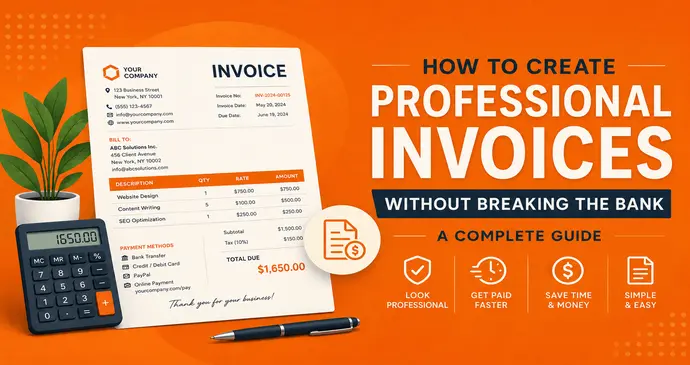
Last week, I watched my neighbor Tom panic over his first big landscaping contract. A great guy knows everything about lawn care, but when it came time to bill his client, he was lost. “How do I make this look professional?” he asked, waving a crumpled piece of paper with some scribbled numbers.
Sound familiar? You’re not alone if you’ve ever stared at a blank document wondering how to create professional invoices that actually get you paid on time. The good news? You don’t need expensive software or a business degree to create invoices that look like they came from a Fortune 500 company.
I’ve helped dozens of small business owners solve this exact problem over the past four years. Here’s everything I’ve learned about creating professional invoices without spending a fortune.
Why Professional Invoices Actually Matter (More Than You Think)
Before we dive into the how-to stuff, let’s talk about why this matters. Because honestly, when you’re running a business, invoice design might seem like the least important thing on your endless to-do list.
But here’s what I’ve observed: businesses that send professional looking invoices get paid faster. It’s that simple.
My friend Lisa runs a freelance marketing consultancy. She used to send invoices that looked like homework assignments – basic formatting, no logo, payment terms buried in tiny text. Her average payment time? Forty-two days.
Then she spent one afternoon creating a proper professional invoice template. Same services, same clients, same payment terms. Her new average? Twenty-six days. That sixteen-day improvement transformed her cash flow overnight.
The Psychology Behind Professional Invoices
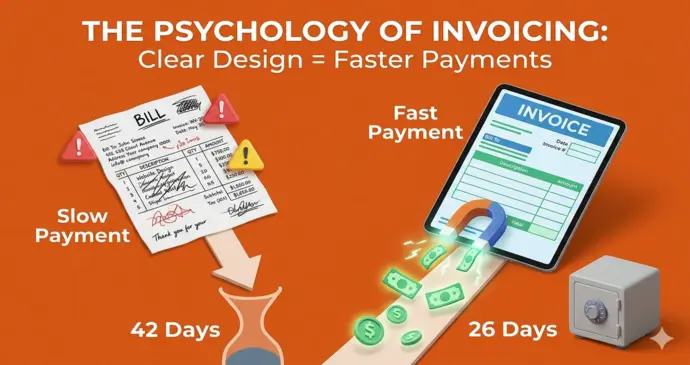
Here’s what’s happening psychologically when clients receive your invoices:
- First Impressions Set Payment Expectations: A polished invoice signals that you’re organized and legitimate. Clients subconsciously assume organized businesses follow up on payments consistently.
- Visual Hierarchy Guides Action: Professional invoices use formatting to draw attention to important information – payment amounts, due dates, payment instructions. Clients process this information faster and act accordingly.
- Brand Consistency Builds Trust: When your invoice matches your business cards, website, and other materials, clients feel like they’re dealing with an established company rather than someone figuring it out as they go.
- Clear Communication Prevents Delays: Professional invoices include all necessary information upfront, eliminating back-and-forth emails that delay payment processing.
The Real Cost of Professional Invoice Design
Let’s get the money question out of the way first. What does it actually cost to create professional invoices?
- The Expensive Route: Premium Software: QuickBooks Pro costs around $30 monthly. FreshBooks starts at $15 but gets expensive fast with multiple clients. Over a year, you’re looking at $180-360 just for invoicing capabilities you might barely use. Also research about QuickBooks Alternatives
- The DIY Route: Templates and Tools: Professional invoice templates can be free or cost $5-20 for premium designs. One-time cost, unlimited usage.
- The Modern Route: Free Professional Tools: Tools like InvoPilot give you professional results without ongoing costs or complicated setup. Professional formatting, instant PDF generation, no monthly fees.
Here’s the math that matters: if professional invoicing gets you paid even five days faster on average, the improved cash flow pays for any tool costs within the first month.
Essential Elements Every Professional Invoice Needs
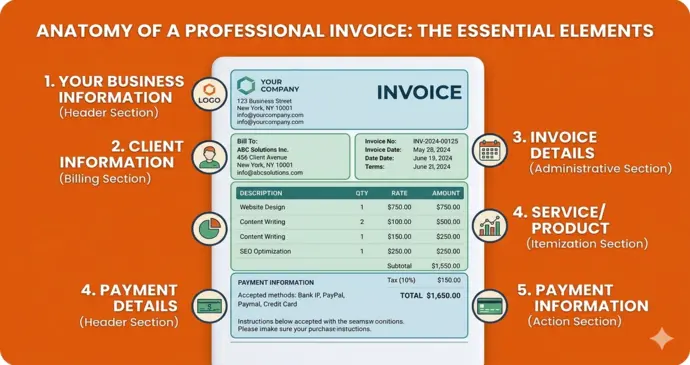
After reviewing hundreds of invoices from successful businesses, these elements appear consistently:
Your Business Information (Header Section)
- Business name prominently displayed
- Your logo (even a simple text-based one works)
- Complete contact information including phone and email
- Business address (builds credibility)
- Website URL if you have one
Client Information (Billing Section)
- Client or company name
- Billing address (important for accounting departments)
- Contact person name and email
- Project or purchase order number if applicable
Invoice Details (Administrative Section)
- Unique invoice number (sequential numbering looks professional)
- Invoice date and due date clearly marked
- Payment terms spelled out explicitly
- Late payment fees if applicable
Service/Product Details (Itemization Section)
- Clear description of work performed or products delivered
- Quantity, rate, and total for each line item
- Subtotal before taxes and fees
- Tax amounts broken down by type
- Final total amount due prominently displayed
Payment Information (Action Section)
- Accepted payment methods listed clearly
- Bank details for wire transfers if needed
- Online payment links if available
- Payment instructions that are impossible to misunderstand
Step-by-Step Guide: Creating Your First Professional Invoice
Let me walk you through the exact process I use when helping businesses create their invoice systems.
Step 1: Gather Your Information
Before opening any software, collect everything you’ll need:
Your Business Details
- Legal business name and any trade names
- Logo files in high resolution (PNG or JPG)
- Complete address and contact information
- Tax ID numbers if required in your industry
- Bank account details for payment instructions
Client Information System
- Standard format for collecting client details
- System for tracking project or job numbers
- Process for confirming billing addresses
- Method for storing contact preferences
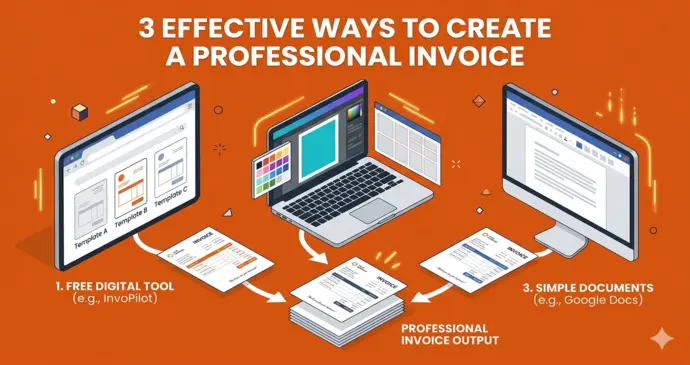
Step 2: Choose Your Creation Method
Based on helping dozens of businesses, here are the approaches that actually work:
- For Simple, Consistent Billing: Free online invoice generators like InvoPilot work brilliantly. Professional templates, automatic calculations, instant PDF downloads. No learning curve, no monthly fees.
- For Design-Heavy Businesses: Canva or similar design tools let you create stunning custom templates. More time-intensive but gives complete creative control.
- For Integration Needs: If you need invoicing connected to accounting software, Word or Google Docs templates might work better for import compatibility.
- For High Volume: Businesses sending 50+ invoices monthly benefit from dedicated software, but start simple and upgrade based on actual needs.
Step 3: Design Your Template Layout
Professional invoice design follows predictable patterns because they work:
- Header Section (Top Third): Your business information goes here, with your logo prominently placed. Don’t make the logo huge – it should look professional, not desperate for attention.
- Client and Invoice Info (Middle Section): Two-column layout works well – client details on the left, invoice specifics (number, date, terms) on the right.
- Itemization Table (Main Body): Clean, easy-to-read table with columns for description, quantity, rate, and totals. Use alternating row colors for easier reading.
- Payment Section (Bottom): Payment instructions, terms, and thank you note. Make this section impossible to miss but not overwhelming.
Step 4: Perfect Your Professional Formatting
Here’s where amateur invoices become professional ones:
Typography That Works
- Use maximum two font families (one for headers, one for body text)
- Maintain consistent sizing throughout
- Ensure text is large enough to read easily (minimum 11pt for body text)
- Use bold strategically to highlight important information
Color Scheme Strategy
- Limit yourself to 2-3 colors maximum
- Use your brand colors if you have them established
- Ensure sufficient contrast for readability
- Consider how invoices will look when printed in black and white
Spacing and Alignment
- Consistent margins throughout the document
- Proper spacing between sections
- Align numbers to the right in tables
- Use white space effectively to avoid cluttered appearance
Professional Polish Details
- Invoice numbering system that makes sense (date-based or sequential)
- Consistent date formatting throughout
- Currency symbols properly formatted
- Professional language and tone in all text
Free Invoice Maker Tools That Actually Work
Let me share the tools I recommend after testing dozens of options:
InvoPilot: The Sweet Spot Solution
InvoPilot hits that perfect balance between ease and professionalism. Here’s why it works so well:
- Immediate Results: No account creation or setup time. Start creating professional invoices in under two minutes.
- Professional Templates: Clean, modern designs that work for any industry. Live preview shows exactly how your finished invoice will look.
- Smart Features: Automatic calculations, tax handling, multi-currency support for international clients. Professional functionality without software complexity.
- Zero Ongoing Costs: Create unlimited invoices without monthly fees or usage limits. Perfect for businesses watching every dollar.
Microsoft Word/Google Docs Templates
- Pros: Complete customization control, works with existing workflows, integrates with other business documents.
- Cons: Manual calculations, formatting can break when editing, requires more setup time.
- Best for: Design-heavy businesses that want complete creative control and don’t mind manual processes.
Canva Invoice Templates
- Pros: Beautiful design options, easy customization, brand kit integration for consistent styling.
- Cons: Requires Canva knowledge, limited automation features, can be overkill for simple billing.
- Best for: Creative businesses where invoice design reflects brand aesthetic and creative capabilities.
Excel/Google Sheets Templates
- Pros: Automated calculations, client database integration, detailed tracking capabilities built-in.
- Cons: Can look technical rather than professional, requires spreadsheet comfort, formatting limitations.
- Best for: Numbers-focused businesses that value data organization over visual polish.
Industry-Specific Professional Invoice Examples
Different industries have different expectations for professional invoicing. Here’s what works:
Service-Based Businesses (Consulting, Marketing, Legal)
- Focus on: Detailed time tracking, clear project descriptions, professional language
- Essential Elements: Hourly rates clearly displayed, project scope outlined, payment terms prominent
- Pro Tip: Include brief descriptions of work completed to justify billing and remind clients of value delivered
Creative Industries (Design, Photography, Writing)
- Focus on: Visual appeal that reflects creative skills, portfolio integration, usage rights clarity
- Essential Elements: Project deliverables listed, revision rounds specified, copyright/usage terms included
- Pro Tip: Your invoice design becomes part of your portfolio – make it reflect your aesthetic capabilities
Product-Based Businesses (Retail, Manufacturing, E-commerce)
- Focus on: Clear product descriptions, shipping information, return policies
- Essential Elements: SKU numbers for tracking, quantity and unit pricing, shipping costs separated
- Pro Tip: Include product images if selling high-value items to confirm order accuracy
Trade Services (Contractors, Repair, Maintenance)
- Focus on: Materials and labor separation, project location, completion confirmation
- Essential Elements: Parts costs itemized, labor hours detailed, warranty information included
- Pro Tip: Include before/after photos for major projects to demonstrate value and prevent disputes
- Also Read About Invoice Trading.
Advanced Professional Invoice Strategies
Once you’ve mastered basic professional invoice creation, these strategies take your billing to the next level:
Payment Speed Optimization
- Early Payment Discounts: Offer 2-3% discounts for payment within 10 days. Often pays for itself through improved cash flow.
- Multiple Payment Options: Accept credit cards, bank transfers, digital payments. Convenience increases payment speed.
- Clear Consequences: State late payment fees and collection procedures upfront. Most clients pay on time when consequences are clear.
- Follow-up Schedule: Professional businesses follow up systematically. Send friendly reminders at 7, 14, and 30 days past due.
Brand Integration Techniques
- Consistent Visual Identity: Use the same fonts, colors, and styling as your other business materials. Recognition builds trust.
- Professional Email Templates: Create matching email templates for sending invoices. Professional presentation extends beyond the invoice itself.
- Digital Business Cards: Include QR codes linking to your website or payment portals. Modern convenience with professional appeal.
Automation Without Software Costs
- Text Expanders: Use phone or computer text expansion for common invoice descriptions, payment terms, and contact information.
- Template Libraries: Create templates for different service types or client categories. Reduces creation time while maintaining customization.
- Batch Processing: Set aside specific times for invoice creation rather than handling individually. More efficient and less stressful.
- Standard Operating Procedures: Document your invoicing process step-by-step. Ensures consistency and makes delegation possible.
Common Professional Invoice Mistakes (And How to Avoid Them)
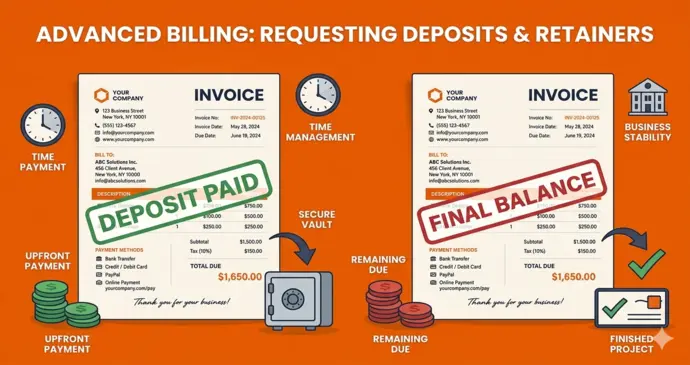
After reviewing hundreds of small business invoices, these mistakes appear repeatedly:
Mistake 1: Information Overload
- Problem: Cramming every possible detail into the invoice layout, making it difficult to find important information.
- Solution: Use clear visual hierarchy to guide attention. Most important information (amount due, due date) should be easiest to find.
- Example: Don’t list every email exchange about the project. Do include concise work summary and clear deliverables.
Mistake 2: Unclear Payment Instructions
- Problem: Assuming clients know how you prefer to be paid or burying payment information in fine print.
- Solution: Make payment instructions prominent and foolproof. Include multiple options when possible.
- Example: Instead of “Payment due upon receipt,” use “Payment due within 30 days. Pay online at [link] or mail check to [address].”
Mistake 3: Inconsistent Branding
- Problem: Invoices that look completely different from other business materials, creating confusion about legitimacy.
- Solution: Establish simple brand guidelines and apply them consistently across all materials including invoices.
- Example: If your business cards use blue headers, your invoices should too. Simple consistency builds professional credibility.
Mistake 4: Poor Mobile Optimization
- Problem: Invoices that are difficult to read or process on mobile devices, which many clients use for business tasks.
- Solution: Test how your invoices look on phones and tablets. Ensure text is readable and payment links work properly.
- Example: Use responsive design principles or tools that automatically optimize for mobile viewing.
Mistake 5: Weak Follow-up Systems
- Problem: Creating beautiful invoices but having no system for tracking payments or following up on overdue accounts.
- Solution: Establish systematic follow-up procedures that maintain professionalism while ensuring payment.
- Example: Send friendly reminders at predetermined intervals rather than waiting until you’re frustrated about late payments.
Legal and Tax Considerations for Professional Invoices
Professional invoices need to meet certain legal requirements depending on your location and industry:
Required Information by Region
- United States: Business name, address, date, sequential numbering, clear payment terms, tax information where applicable.
- European Union: VAT numbers, reverse charge notifications where applicable, specific formatting requirements for cross-border transactions.
- Canada: GST/HST registration numbers, provincial tax requirements, proper business identification.
- Australia: ABN (Australian Business Number), GST details, proper business name registration.
Record Keeping Best Practices
- Digital Copies: Maintain PDF copies of all invoices sent, organized by date and client for easy retrieval.
- Payment Tracking: Document when invoices are paid, payment method used, and any discrepancies or disputes.
- Tax Preparation: Organize invoices in ways that simplify tax filing – by quarter, by client, or by service type depending on your needs.
- Backup Systems: Store invoice copies in multiple locations (cloud storage, local backups) to prevent data loss.
Also Read About Tax Invoice.
Measuring Professional Invoice Success
Track these metrics to understand how professional invoicing impacts your business:
Payment Speed Metrics
- Average Days to Payment: Track how long clients take to pay on average. Professional invoicing should reduce this number.
- On-time Payment Rate: Percentage of invoices paid by the due date. Target 80%+ for healthy cash flow.
- First-time Payment Rate: Percentage of invoices paid without requiring follow-up. Professional invoices increase this rate.
Client Satisfaction Indicators
- Payment Compliance: Professional clients tend to pay more consistently and completely.
- Communication Reduction: Fewer questions about invoice details indicates clear, professional presentation.
- Referral Rates: Satisfied clients refer more business. Professional invoicing contributes to overall satisfaction.
Business Impact Measures
- Cash Flow Improvement: Faster payments directly impact cash flow and business growth capabilities.
- Time Savings: Professional invoice systems reduce administrative time, freeing resources for revenue-generating activities.
- Professional Reputation: Consistent, professional billing contributes to overall business credibility and client relationships.
Scaling Your Professional Invoice System
As your business grows, your invoicing needs will evolve. Here’s how to scale professionally:
From 1-10 Invoices Monthly
- Focus: Establishing consistent processes and professional presentation
- Tools: Free invoice generators work perfectly at this volume
- Priority: Building good habits and understanding what information clients need
From 10-25 Invoices Monthly
- Focus: Streamlining creation process and improving payment speed
- Tools: Consider templates or simple automation to reduce time investment
- Priority: Tracking payment patterns and optimizing terms for faster collection
From 25-50 Invoices Monthly
- Focus: Automation and systematic follow-up procedures
- Tools: May justify paid software if time savings exceed subscription costs
- Priority: Implementing systems that maintain quality while reducing manual work
50+ Invoices Monthly
- Focus: Integration with other business systems and advanced automation
- Tools: Professional software likely provides good ROI at this volume
- Priority: Comprehensive reporting and analytics to optimize business performance
Future-Proofing Your Invoice Strategy
Technology continues evolving, but certain principles remain constant for professional invoicing:
Emerging Trends to Watch
- Mobile-First Design: More businesses handle invoicing entirely on mobile devices. Ensure your processes work seamlessly on phones and tablets.
- Instant Payment Options: Digital payment methods continue expanding. Consider how to integrate these without complicating your system.
- Automated Follow-up: Even free tools are beginning to offer automated reminder capabilities. Evaluate these features as they become available.
- AI-Powered Insights: Advanced analytics about client payment behavior are becoming accessible to small businesses. Use these insights to optimize your approach.
Timeless Professional Principles
- Clarity Over Cleverness: Information should be easy to find and understand, regardless of design trends.
- Consistency Builds Trust: Uniform formatting and branding across all invoices reinforces professional credibility.
- Client-Focused Design: Consider invoice processing from the client’s perspective, not just your internal needs.
- Continuous Improvement: Regularly review and refine your invoicing process based on results and feedback.
Taking Action: Your Next Steps
Creating professional invoices without breaking the bank isn’t complicated, but it does require intentional effort. Here’s your action plan:
This Week: Foundation Setup
- Day 1-2: Gather all necessary business information and client details
- Day 3-4: Choose your invoice creation method based on your needs and technical comfort
- Day 5: Create your first professional invoice template and test it with a sample client
- Weekend: Review and refine based on how the template looks and functions
Next Two Weeks: Implementation and Testing
- Week 2: Use your new professional invoice system for all new billings
- Week 3: Track client responses and payment speeds compared to your previous approach
- Ongoing: Make small adjustments based on what works best for your specific situation
First Month: Optimization and Scaling
- 30 Days: Analyze payment speed improvements and client feedback
- 45 Days: Decide whether your chosen approach meets long-term needs or requires upgrades
- 60 Days: Establish systematic procedures for consistent professional invoicing moving forward
Remember, the goal isn’t perfection from day one. The goal is significant improvement in professionalism and payment speed without breaking your budget. Start with tools like InvoPilot that give you professional results immediately, then evolve your approach based on real business needs rather than theoretical requirements.
Conclusion: Professional Invoicing as Business Investment
Creating professional invoices without expensive software isn’t just about saving money – it’s about building a more successful business. Professional billing practices improve cash flow, enhance client relationships, and establish credibility that supports long-term growth.
The businesses I’ve worked with that prioritize professional invoicing consistently outperform those that treat billing as an afterthought. Not because of magic invoice designs, but because professional systems create better client experiences and more predictable cash flow.
Start simple, focus on clarity and consistency, and remember that professional appearance is more about attention to detail than expensive tools. Your future self (and your bank account) will thank you for establishing these practices early.
Ready to create professional invoices that get you paid faster? Try InvoPilot’s free invoice maker and see how quickly you can transform your billing process. No signup required, no monthly fees – just professional results that help your business succeed.
Frequently Asked Questions
How long should it take to create a professional invoice?
With the right template or tool, professional invoices should take 3-5 minutes to create. If you’re spending more than 10 minutes per invoice, you need better tools or templates.
Do I really need a logo for professional invoices?
A logo helps but isn’t essential. Consistent typography, clean formatting, and complete information matter more than graphics. Many successful businesses use text-based headers effectively.
What’s the most important element for getting paid faster?
Clear payment instructions and prominent due dates have the biggest impact on payment speed. Make it impossible for clients to claim confusion about when or how to pay.
Should I include payment terms on every invoice?
Yes, always include payment terms even if you’ve discussed them previously. This eliminates confusion and provides legal protection if collection becomes necessary.
How do I handle clients who consistently pay late despite professional invoices?
Professional invoicing improves payment compliance but doesn’t solve all collection issues. Consider requiring deposits, shortening payment terms, or implementing late fees for chronic late payers.
What’s been your biggest challenge with creating professional invoices? Have you found tools or strategies that work particularly well for your industry? Share your experience in the comments – other business owners would love to learn from your successes and mistakes.
Create Invoices Instantly – Free & Easy!
Generate professional invoices in seconds with our Free Online Invoice Generator.
👉 Invoice Generator