
Key Takeaways:
- Invoices for bookings made through third-party travel agencies are not available from Expedia — contact your agency directly.
- Expedia sends an invoice or receipt to your email after every confirmed booking.
- You can download any past invoice anytime from My Trips → booking details → Receipt/Invoice.
- For hotel invoices, check both the Expedia invoice and any property-level invoice from the hotel at check-out.
- For GST/tax invoices, contact Expedia support with your GSTIN and booking number.
Expedia automatically sends an invoice or receipt to your registered email address after every confirmed booking. You can also download it at any time from the My Trips section of your account — no waiting required. This guide covers everything you need to know: how to get your Expedia hotel invoice, Expedia receipt, or Expedia tax invoice for business purposes; what each line on an Expedia receipt breakdown means; how to request an invoice; and exactly what to do when your invoice is missing.
What is an Expedia invoice? (Receipt vs Invoice explained)
An Expedia invoice is an official payment document issued by Expedia for any booking made directly on their platform. It serves as legal proof of payment and includes your booking details, the amount charged, applicable taxes, and cancellation or refund terms.
The terms “invoice” and “receipt” are often used interchangeably on Expedia, but there is a practical distinction worth knowing:
- Expedia receipt: A summary confirmation sent immediately after booking. It shows what you paid but is less formal in structure.
- Expedia invoice: A more detailed billing document — often the version needed for business expense reimbursement, tax filing, or accounting purposes. It may include a line-by-line cost breakdown, tax amounts, and the supplier’s details.
For personal travel, either document works. For business travel, always request the invoice rather than the receipt, as it carries more financial detail.
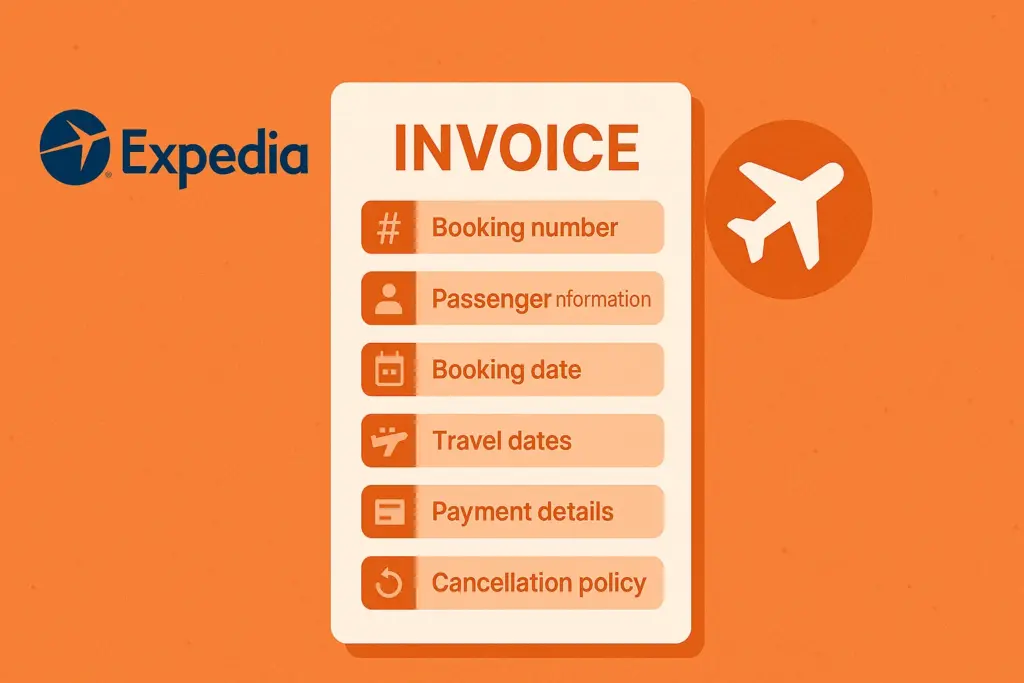
Main Information Found on an Expedia Invoice
- Booking confirmation number — the unique ID for your reservation
- Traveller name(s) — passenger or guest details
- Booking date — when you made the reservation
- Travel or check-in / check-out dates — the service period
- Property or airline name — hotel name, airline, or car rental company
- Payment breakdown — base cost, taxes, fees, and any discounts applied
- Total amount charged — including all charges in your payment currency
- Cancellation and refund policy — terms applicable to this booking
Why Is an Expedia Invoice Important?
- Expense reimbursement: Employers require an official invoice as proof before reimbursing business travel costs.
- Tax filing: Self-employed individuals and businesses can deduct eligible travel expenses — the invoice is the required supporting document.
- GST/VAT claims: Businesses registered for GST or VAT need a tax-compliant invoice to claim input tax credit.
- Dispute resolution: If there is a billing error or overcharge, having the invoice on hand is essential when contacting Expedia or your bank.
- Audit trail: For businesses, invoices form part of your financial records and may be required during an audit.
Expedia Receipt Breakdown — What Each Line Means
When you download an Expedia receipt or invoice, you will see several line items that are not always self-explanatory. Here is exactly what each charge means:
For Hotel Bookings
| Line item on receipt | What it means |
|---|---|
| Room rate / base rate | The nightly cost of the room before taxes and fees. Multiplied by the number of nights. |
| Taxes and fees | A combined line item covering local hotel taxes, city taxes, tourism levies, and government-mandated charges. The exact breakdown varies by country and city. |
| Expedia service fee | A platform fee charged by Expedia for processing the booking. This is Expedia’s revenue, separate from what the hotel receives. |
| GST / VAT | Goods and Services Tax or Value Added Tax, applied on Expedia’s service fee in countries where applicable (including India, UK, Australia, and EU countries). In India, this is 18% GST on Expedia’s service fee. |
| Property fee / resort fee | Charged separately by some hotels at check-out for amenities like Wi-Fi, pool access, or parking. Not always collected by Expedia — may appear on the hotel’s own bill. |
| Discount / coupon savings | Any promotional code, One Key cash, or member savings applied to your booking. |
| Total charged | The final amount debited from your payment method, inclusive of all taxes, fees, and discounts. |
For Flight Bookings
| Line item on receipt | What it means |
|---|---|
| Base fare | The published ticket price before government taxes and airline fees. |
| Airline taxes | Government-imposed taxes such as airport tax, passenger duty, and fuel surcharge. These are passed directly to the airline and government. |
| Booking fee | Expedia’s own fee for booking the flight on your behalf. |
| Seat selection / baggage add-ons | Optional extras added at checkout — these are itemised separately. |
| Total charged | The complete amount debited, including all taxes, fees, and add-ons. |
Important: If the amounts on your Expedia receipt and your bank statement do not match, it may be due to foreign exchange conversion charges applied by your bank or card provider — not an Expedia error.
How Do I Get My Receipts From Expedia?
To get receipts from Expedia, log in to your account and go to My Trips. Select the booking you need a receipt for, then click Receipt or Invoice to download the PDF. Receipts are also sent to your email address automatically after every confirmed booking.
Here are the full steps:
- Log in to your Expedia account at expedia.com using your registered email address and password.
- Click your profile icon in the top-right corner of the page.
- Select “My Trips” from the dropdown menu. This shows all your current, upcoming, and past bookings.
- Find the booking you need the receipt for. Use the search bar or scroll through your list. You can filter by flight, hotel, or car rental.
- Click on the booking to open the full booking details page.
- Scroll to the payment section and look for the “Receipt”, “Invoice”, or “View receipt” button.
- Download or email the receipt. Click to download a PDF copy directly, or select “Email receipt” to have it sent to your inbox.
On the Expedia mobile app: Open the app → tap the suitcase icon (Trips) → select the booking → tap the three-dot menu or “Booking details” → tap “Receipt”.
From your confirmation email: Search your inbox for an email from expedia@expediamail.com with the subject “Your trip confirmation” or “Booking confirmed”. The receipt is attached or accessible via the link inside the email.
How To Get An Expedia Hotel Invoice
For an Expedia hotel invoice, go to My Trips, select your hotel booking, and download the invoice from the booking details page. The process takes under two minutes and produces a PDF that includes the hotel name, check-in and check-out dates, room rate, and all charges.
However, there is an important distinction to understand with hotel bookings:
Expedia Invoice Vs Hotel Property Invoice
| Document type | Issued by | What it covers | When you need it |
|---|---|---|---|
| Expedia hotel invoice | Expedia | Total amount charged to your card by Expedia, including their service fee and applicable taxes | Business expense reimbursement, tax filing, GST claims |
| Hotel property invoice (folio) | The hotel directly | Room charges, minibar, room service, resort fees, and any extras charged at the property | When your company requires the hotel’s own itemised bill; for expenses incurred at the hotel during your stay |
Key point: If you paid Expedia in advance (pre-paid booking), the hotel does not charge you directly and will not issue you a hotel folio for the room cost. The Expedia invoice is your primary document. If you chose a “pay at hotel” rate, the hotel invoices you directly at check-out for the room, and Expedia may charge only its service fee separately.
How To Get the Hotel’s Property Invoice
- Request the hotel folio (also called “hotel bill” or “hotel receipt”) at the front desk on the day of check-out.
- Ask for it to be itemised — this shows each night’s room rate separately, which is often required for expense claims.
- If the hotel cannot produce it on check-out, contact the hotel directly using the contact details shown in your Expedia booking confirmation.
How To Get An Expedia Tax Invoice for Business (Including GST Invoice for India)
Expedia issues tax invoices for eligible bookings. The standard invoice downloaded from My Trips usually includes tax information. However, businesses — especially in India — often need a GST-compliant invoice that shows their GSTIN, the GST amount charged, and Expedia’s own GSTIN. Here is how to get it.
Standard tax invoice (all countries)
- Download your invoice from My Trips as described above.
- Check that the invoice clearly shows: total amount, tax label (GST, VAT, or local tax name), and the tax amount charged.
- If these are present, the document is sufficient for most business expense and tax purposes.
GST invoice for Indian businesses
If you are an Indian business traveller or company booking travel on Expedia, you may need a GST-compliant tax invoice that includes your company’s GSTIN so you can claim input tax credit on the GST charged by Expedia.
- Add your GSTIN to your Expedia account before booking. Go to account settings → billing information → enter your GSTIN. This allows Expedia to include it on future invoices automatically.
- For existing bookings: Contact Expedia customer support via live chat or phone with your booking confirmation number and your GSTIN. Request a GST-compliant tax invoice.
- Key details to provide:
- Full legal company name
- GSTIN number
- Registered business address
- Expedia booking confirmation number
- Expedia’s GSTIN (for your records when filing returns): Expedia is registered under its Indian entity. Verify the current GSTIN on the invoice you receive from Expedia — it should appear in the “Supplier” section of the tax invoice.
Note: GST at 18% is applicable on Expedia’s service fee component of your booking, not on the base hotel or airline rate (which may attract GST at its own rate, paid directly by the property or airline). Your Expedia tax invoice covers only the portion Expedia charges you directly.
Need to generate your own business invoices with GST? Use InvoPilot’s free GST Calculator or Invoice Generator for your own client billing.
Does Expedia Issue Invoices?
Yes, Expedia issues invoices for all bookings made directly on their platform — including flights, hotels, car rentals, and vacation packages. Your invoice is sent to your email immediately after booking confirmation and is always available for download from the My Trips section of your account.
Expedia does not issue invoices for:
- Bookings made through a third-party travel agency that used Expedia’s inventory
- Bookings made on partner platforms that are not expedia.com directly (such as Orbitz, Travelocity, or Hotels.com — which are separate Expedia Group brands with their own invoice processes)
How To Find Past Purchases on Expedia
To find past purchases on Expedia, sign in to your account and click My Trips from the profile icon in the top-right menu. All confirmed, past, and cancelled bookings are listed there, along with their receipts and invoices available for download.
If a past trip is not showing:
- Check that you are signed in to the correct account. If you booked as a guest, the booking will not appear in My Trips. In that case, use the booking confirmation email to access your receipt — there is a link in the email.
- Guest booking look-up: Go to expedia.com/trips → click “Find a trip” → enter your booking confirmation number and the email used at time of booking.
- Bookings older than 2 years may be archived. Contact Expedia customer support with the booking confirmation number to retrieve the invoice.
How To Request An Expedia Invoice — All Methods
There are three ways to get or request an Expedia invoice, depending on your situation:
Method 1: Download from My Trips (fastest)
The quickest way — takes under 2 minutes. Follow the 7 steps in the “How do I get my receipts from Expedia?” section above. No need to contact support.
Method 2: From your confirmation email
Search your inbox for an email from Expedia with the subject line “Your booking is confirmed” or “Your trip confirmation”. The email contains a link to view and download your invoice. If you cannot find the email, check your spam folder and search for the sender address expedia@expediamail.com.
Method 3: Contact Expedia customer service
If you need a specific invoice format (such as a GST tax invoice), cannot access your account, or need an invoice for a very old booking, contact Expedia support directly:
- Live chat: Available 24/7 on expedia.com — click “Support” in the top menu, then start a chat.
- Phone: Find your country’s customer service number at expedia.com/helpcenter.
- Help Centre: Browse help articles for self-service options.
What Documents Do I Need to Request an Expedia Invoice?
In most cases, you need nothing more than access to your Expedia account to download your invoice. If you are contacting customer support for a specific invoice request, have the following ready to speed up the process:
- Booking confirmation number — found in your confirmation email and in My Trips
- Email address used for the booking
- Traveller name as it appears on the booking
- Date of travel or check-in date
- GSTIN (for Indian businesses) — if requesting a GST-compliant tax invoice
- Company name and registered address — if the invoice must be made out to a business entity
You do not need to provide payment card details, a government ID, or any additional documentation for a standard invoice request.
What to Do If Your Expedia Invoice or Receipt is Missing
If you have not received your Expedia invoice by email or cannot find it in your account, work through these steps in order:
Step 1: Check Your Spam or Junk Folder
Expedia emails are occasionally filtered into spam by email providers. Search your inbox for “Expedia” or “booking confirmed” across all folders, including promotions and junk.
Step 2: Download Directly From My Trips
Log in to expedia.com → My Trips → select the booking → scroll to the payment section → click “Receipt” or “Invoice”. This works regardless of whether the email was delivered. This is the most reliable method.
Step 3: Use the Guest Booking Look-up
If you booked as a guest (without an account), go to expedia.com/trips → “Find a trip” → enter your booking confirmation number and booking email. You can download your receipt from there.
Step 4: Check the Booking Status
Expedia only issues invoices for confirmed bookings. If your booking is still pending, the invoice will not be available until confirmation is received from the hotel or airline — this can take up to 24 hours for some properties.
Step 5: Contact Expedia support
If none of the above steps work, contact Expedia customer service via live chat at expedia.com with your booking confirmation number. They can manually generate and send your invoice within 24–48 hours.
Common Issues with Expedia Invoices
Invoice not Available in My Trips
This usually happens when the booking is in a “pending” or “processing” state. Wait 24 hours and try again. If the booking shows as confirmed but the invoice is still not there, contact support.
Name or Amount on the Invoice is Incorrect
Discrepancies in the name, booking dates, or amount on your Expedia invoice should be reported to Expedia customer support immediately. Provide your booking confirmation number and a clear description of the error. Do not attempt to alter the invoice yourself — this voids its validity.
Invoice Does Not Show Tax Breakdown
Some Expedia invoices show a combined “taxes and fees” figure without itemising each tax. If you need an itemised tax breakdown (for example, to separate GST from other fees), contact support and request a detailed tax invoice.
Invoice Shows a Different Amount than your Bank Statement
This is almost always a foreign exchange issue. If your card is in a different currency from the booking currency, your bank converts the charge at its own exchange rate and may add a foreign transaction fee. The Expedia invoice amount is in the booking currency and is correct — the difference is your bank’s fee.
Locked Out of your Expedia Account
If you cannot access your account, use the “Forgot password” option on the sign-in page to reset your credentials. Once back in, your invoices will be accessible in My Trips. Alternatively, use the guest booking look-up with your confirmation number and booking email.
Can I Get An Expedia Invoice for a Booking made through a Travel Agency?
No. If your booking was made through a third-party travel agency — even if the agency used Expedia’s inventory to make the reservation — Expedia will not issue you a direct invoice. The travel agency is the merchant of record for that transaction.
To get your invoice in this case:
- Contact the travel agency that handled your booking.
- Provide your booking confirmation number and the travel dates.
- Request a formal invoice from the agency — they are legally required to provide one.
If the agency booked on Expedia on your behalf and refuses to provide documentation, you can try contacting Expedia support with the agency’s booking reference number to confirm what records exist — but Expedia is not obligated to issue an invoice to a traveller who is not their direct customer in this scenario.
How to Contact Expedia Customer Service about an Invoice
Expedia offers several support channels. For invoice-related queries, live chat is the fastest option — most issues are resolved in under 10 minutes.
- Live chat (recommended): Go to expedia.com/helpcenter and click “Chat with us”. Available 24/7. Have your booking confirmation number ready.
- Phone support: Phone numbers vary by country. Visit the Help Centre link above to find your local number. For India: check the Expedia Help Centre for the current India support line.
- Email / contact form: Available through the Help Centre for non-urgent requests. Allow 2–3 business days for a response.
- Social media: Expedia is responsive on X (formerly Twitter) at @Expedia — useful for escalating unresolved issues.
- Expedia app: Open the app → tap the account icon → Help → Chat or Call.
When contacting support about an invoice, always include: your full name, booking confirmation number, travel dates, and the specific issue (missing invoice, incorrect details, tax invoice request)
FAQs about Expedia Invoices and Receipts
How do I get my receipts from Expedia?
Log in to expedia.com, go to My Trips, select the booking, and click “Receipt” or “Invoice” to download a PDF. Receipts are also sent to your email automatically after every confirmed booking.
Does Expedia issue invoices?
Yes. Expedia issues invoices for all direct bookings made on expedia.com or the Expedia app — including hotels, flights, car rentals, and packages. The invoice is emailed after confirmation and available in My Trips.
How to find past purchases on Expedia?
Sign in to your account → click your profile icon → select “My Trips”. All past and current bookings are listed here with invoice download options.
Can I get a receipt from Booking.com?
Yes, but Booking.com and Expedia are completely separate platforms. Log in to your Booking.com account → click your name → “Bookings” → select the booking → “Download invoice”. This is unrelated to your Expedia account.
How do I get an Expedia hotel invoice?
Go to My Trips → select your hotel booking → scroll to the payment section → click “Invoice” or “Receipt”. For a property-level hotel invoice (folio), request it from the hotel front desk at check-out.
How long does it take to receive an Expedia invoice?
Invoices are available immediately after your booking is confirmed. The confirmation email with receipt is sent within minutes. If the invoice is not showing in My Trips within 24 hours of a confirmed booking, contact Expedia support.
What if my Expedia invoice has the wrong name or amount?
Contact Expedia customer service via live chat immediately. Provide your booking confirmation number and the details of the error. Do not attempt to alter the invoice document yourself.
Can I get a GST invoice from Expedia?
Yes. Add your GSTIN to your Expedia account settings before booking, or contact Expedia support after booking with your GSTIN and booking confirmation number to request a GST-compliant tax invoice.
Create Invoices Instantly – Free & Easy!
Generate professional invoices in seconds with our Free Online Invoice Generator.
👉 Try the Invoice Generator Now