
Overseeing business finances involves more than just monitoring cash flow; it requires precision and effectiveness in the process. That’s where coding invoices becomes relevant. Regardless if you’re a freelancer, a small business owner, or a member of a large accounting team, invoice coding is essential for ensuring that every transaction gets documented under the correct category. It assists in maintaining organization, simplifies financial reporting, and guarantees adherence to tax and audit regulations.
This blog will explain all the essential details about invoice coding—its definition, significance, functionality, and how tools such as InvoPilot can streamline and automate the process for you. We’ll address everything from typical issues to effective strategies, using straightforward and clear language.
Let’s get to the bottom of invoice coding and eliminate the confusion—once and for all
What Is Invoice Coding?
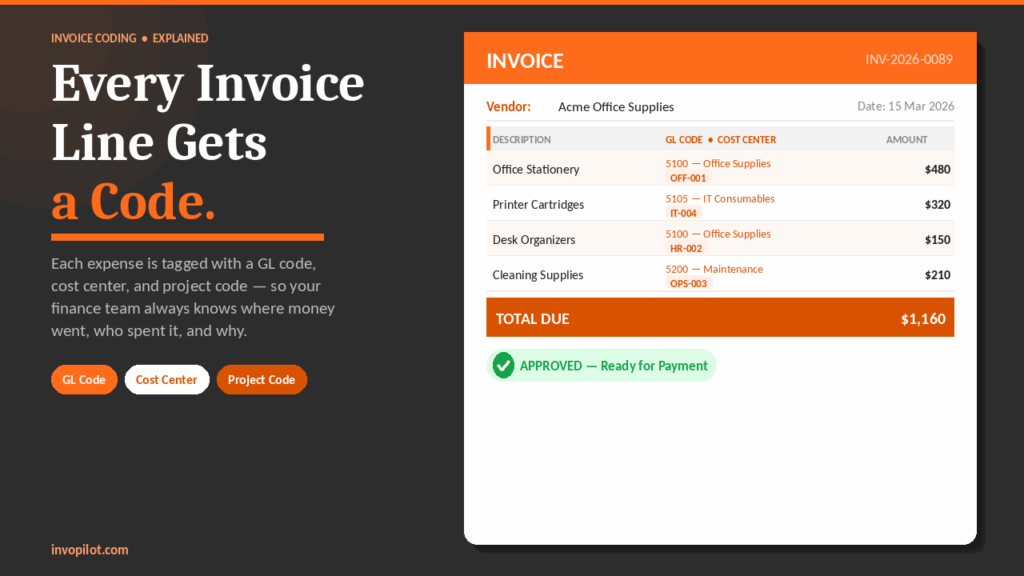
Invoice coding is the process of providing a specific accounting code to each item or service listed on an invoice. These codes, such as General Ledger (GL) codes, cost center codes, department -IDs or project codes, help your company to know exactly what each cost is for. When your business receives an invoice, coding connects each purchase to the correct financial category. This makes it clear what was purchased, what team or project it is connected to, and how it affects your company’s budget.
The main reason for invoice coding is important is that it keeps financial items pretty and easy to understand. If each item on an invoice has a correct code, your company can track where the money goes without confusion. This makes it easy to create accurate financial reports, plan future budgets and look for any errors under audits. It also saves time for the accounting team since everything is organized in the right place.
Simply put, invoice coding works just like labeling school books by subject – food, science or English – so you know where everything belongs. For your company, coding ensures that expenses are clearly organized, making it easier to track, analyze and manage expenses.
Why Correct Invoice Coding Matters for Every Business?
Proper invoice coding is not just an extra step in accounting. It is one of the important keys to keep the business economy clean, accurate and easy to manage. When invoices are coded correctly, it becomes much easier to track expenses, prepare reports and avoid errors. Let’s look at why invoice coding is so important:
1. Holds financial records accurate
Each expense or payment of your business must be placed in the correct category. If an invoice is entered under the wrong category, your financial reports will give the wrong picture of the company’s expenses. With the correct coding, each transaction is registered correctly and helps you make the financial data reliable.
2. Make budget tracking easier
Companies often plan budgets to control how much money is spent in different areas. Proper invoice coding helps leaders to see where money goes in real time. If the expenses begin to exceed the budget, you can take quick measures before the problem becomes larger.
3. Simplifies audits and reduces the risk
During an audit, each transaction must be checked. A correct coded invoice clearly shows what was purchased, who approved it, and what department or project it was for. This clear record reduces confusion, prevents legal or tax problems, and keeps the company in accordance with rules.
4. Speeds payments
When invoices are coded correctly, the team to be paid (Ap) can confirm and approve them quickly. This means fewer delays, fewer errors such as duplicate payments and no lost due date. It helps you build good relationships with suppliers as well.
5. Helps with better decision -making
Business leaders rely on financial data to make smart decisions. With organized and coded invoices, you can easily see consumable patterns, identify areas where costs can be reduced and plan future investments.
6. Track project expenses
If your company is running multiple projects, the correct coding can track costs for each project separately. This makes it easier to check if a project is running within the budget and preparing detailed reports for customers or management.
7. Creates clear approval work flow
Some coding systems include details about which manager or department needs to approve an invoice. This prevents unauthorized expenses, reduces confusion and keeps the approval process steady.
What Is Invoice Coding Used For?
Invoice coding is not just about adding labels to expenses-it is like organizing all the financial information of a business in a clean and easy-to-understand way. It helps companies to keep track of where their money goes and how they are spent. This is why invoice coding is so important:
1. Categorizing and Allocating Expenses
Each line on an itemized invoice is marked or categorized under the correct expense type. For example, if the company spends money on office supplies, travel, marketing or IT services, invoicing ensures that each expense goes under the correct heading. It also assigns the costs of the right department, such as HR, sales or production — this is a key part of the broader invoice-to-cash process that keeps your AP and AR in sync.
2. Improving Budgeting and Forecasting
When invoices are properly coded, finance teams can clearly see how much is used in different areas. This data helps them plan better budgets and predict future expenses. For example, if marketing costs were high last year, they can predict how much to spend this year and avoid overuse.
3. Supporting Compliance and Regulatory Reporting
Businesses must follow rules related to taxes, industry standards and financial reporting (such as GAAP or IFRS). Proper coding makes it easy to prepare accurate financial reports and meet these legal requirements without missing important details.
4. Measuring Project or Client Profitability
Companies working on projects or serving multiple customers use invoice code to track how much each project or client costs. This helps them find out if a project is profitable or not. For example, a software company may know how much they spent on a client project and compare it to what they served.
5. Enhancing Accounts Payable Efficiency
Payable accounts (the process of paying bills) becomes faster and easier when invoice data is organized with the correct coding. It’s like having a clean spreadsheet where every expense is easy to find. Many companies also use automation tools that rely on invoice code to quickly process payments.
6. Quality and Traceability Control
In industries such as production or medicines, invoices may include batch numbers or serial IDs. This helps to track raw materials, identify quality problems and manage recalls if something goes wrong. Coding acts as a tracking system for each product or material used.
7. Simplifying Reconciliation
Sometimes a single payment can cover multiple invoices or be shared over different projects. Without coding, it would be difficult to find out which payment goes where. Proper coding ensures that everything matches correctly during Invoice Reconciliation (the process of checking and confirming accounts).
Types of Codes Used in Invoice Coding
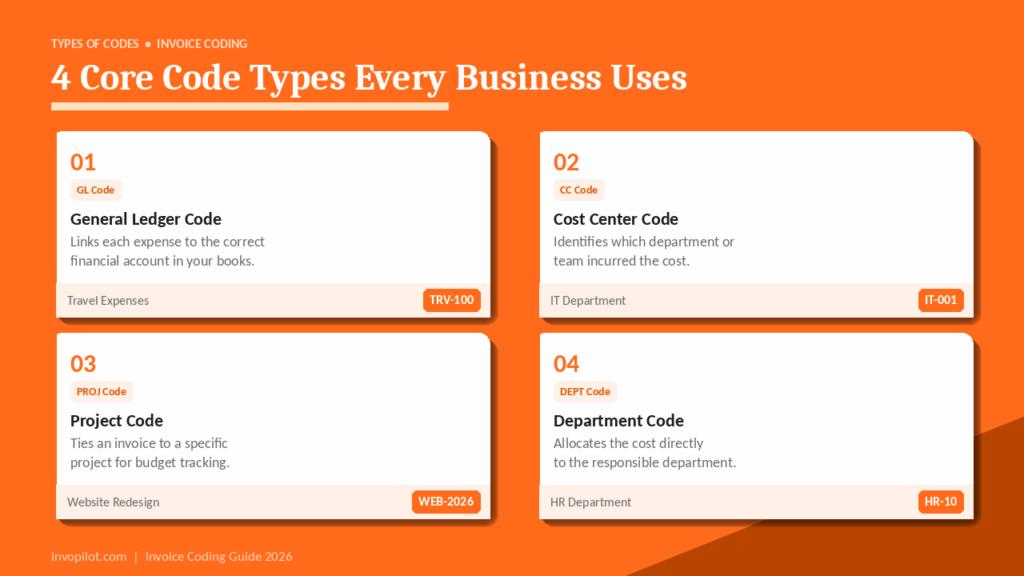
When companies handle invoices, they use different types of codes to organize and track information. These codes act as labels, making it easier to understand where the money is going, who is responsible and what the expenses are for. Below are the usual types of codes used in invoice coding:
1. General Ledger (GL) Codes
GL codes are used to group expenses by type. For example:
- A GL code for travel expenses might be “TRV100”.
- Office supplies might have a code like “OFF200”.
Each GL code is connected to a specific account in the company’s accounting system. This makes it easy to see how much money is spent on each type of expense.
2. Cost Center Codes
A cost center code shows which department or team spent the money. For example:
- “IT001” could represent the IT department.
- “OPS002” could represent the Operations team.
This helps companies track spending for each department and control their budgets.
3. Project Codes
When a company works on different projects, it uses project codes to track costs for each project separately. For Example: If a company is building a website, all related expenses might have the project code “WEB2026”. This helps managers check if a project is within budget and profitable.
4. Department Codes
Similar to cost center codes, department codes show which department made the purchase. For example, “HR10” could be the HR department. This is helpful for department heads to monitor their spending.
5. Alphanumeric Codes
These codes use both letters and numbers to make them easier to read. For Example: “MKT-2026” might mean “Marketing 2026”. Alphanumeric codes are short, simple, and quick to understand.
6. Hierarchical Codes
These codes break down information into layers or levels. For Example: “100-Marketing-Events” could mean:
- “100” = Marketing
- “Events” = A subcategory of Marketing
This gives more details about where money is spent.
7. Date and Time Stamps
Adding the date to an invoice number makes it easier to sort and find invoices later. For Example: “INV-20260212” means the invoice was created on 12th February 2026.
8. Vendor and Customer Numbers
These codes identify who sent or received the invoice. For Example: A vendor code “VEND-01” might be for a supplier, while “CUST-10” could be a customer number. This helps in tracking payment history and managing relationships.
9. Purchase Order (PO) Numbers
A purchase order number links an invoice to the original order. For Example: If you ordered 100 chairs, the PO number ensures the invoice matches the order and correct price.
How to Code Invoices (Step-by-Step Guide)
Coding an invoice may sound complicated, but it is actually just about organizing and labeling all the information correctly so that your accounts stay clear and accurate. Here is a simple step-by-step guide:
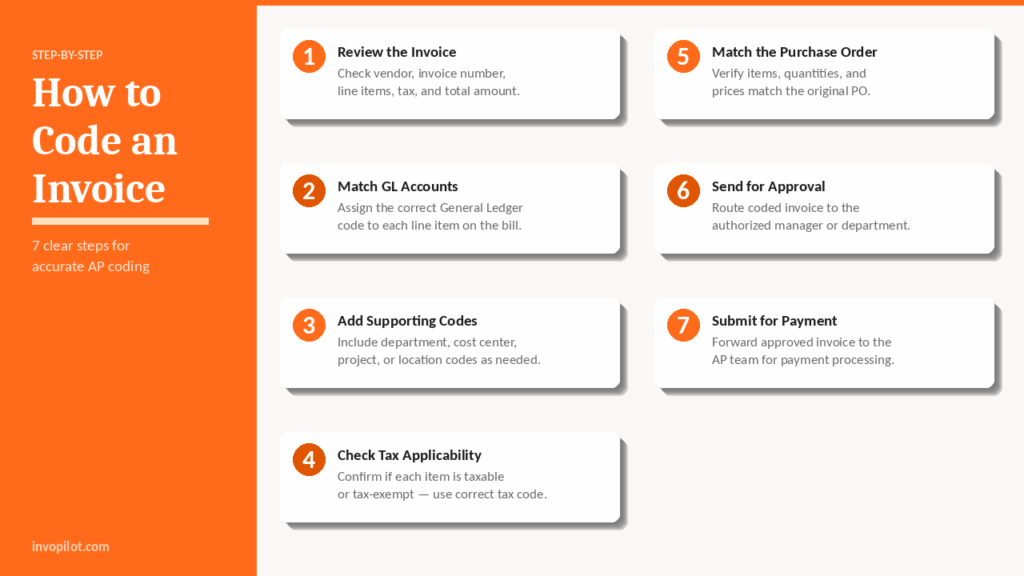
1. Review the Invoice Carefully
The first step is to look at the invoice and check all the important details. Make sure everything is correct, such as:
- The vendor’s name (the person or company sending the invoice).
- The invoice number and date.
- All line items and descriptions (products or services listed on the bill).
- The tax, discounts, and total amount due.
Think of this step like double-checking your shopping receipt before you pay.
2. Match Items to the Correct GL Accounts
Every business uses a chart of accounts to track where money is going. A GL code (General Ledger code) is like a label that tells you what the expense is for—such as office supplies, travel, or utilities. Look at each item on the invoice and assign the correct GL code. This makes future tracking and reporting much easier.
3. Add Any Extra Codes
Besides GL codes, some companies use other codes to get a more detailed picture of expenses. These may include:
- Department codes – to show which department spent the money.
- Cost center codes – to group related costs together.
- Project or job numbers – if the expense is tied to a specific project.
- Location codes – to identify which office or store made the purchase.
4. Check for Tax Applicability
Not all items are taxable. Carefully check if each product or service on the invoice is taxable or tax-exempt. Use the correct tax code to avoid errors when calculating the final amount.
Also Check: Tax Invoice
5. Match the Invoice with the Purchase Order (PO)
If your company uses purchase orders, match the invoice with the PO. This means confirming that:
- The items delivered match the order.
- The quantities and prices are the same as agreed.
- There are no missing or extra charges.
6. Send for Approval
Once you have coded everything, the invoice needs to be approved by the right person or department. This step depends on your company’s internal rules. Sometimes it’s a manager, and other times it could be the finance department.
7. Submit for Payment
After approval, forward the invoice to the Accounts Payable (AP) team. They will handle the payment process and ensure the vendor is paid on time.
Invoice Coding Examples
Invoice coding is like giving each purchase or expense their own “ID card.” This helps companies to know exactly where their money is going. Below are a few simple examples that show how invoice codes work in real life.
1. Basic Example
Imagine your HR department buys some stationery, like pens and notebooks. The company wants to record this expense. An invoice code might look like this:
5100 (Office Supplies) – HR001 – $200
- 5100 (Office Supplies): The expense category is office supplies.
- HR001: The HR department is making the purchase.
- $200: The total cost of the items.
This code tells the finance team that the HR department spent $200 on office supplies.
2. Detailed Example
Let’s say the marketing team organizes a big event, like a product launch, and hires a catering service. The invoice code may look like this:
6550 (Events) – 300 (Marketing) – Q2-2026 (Project Launch) – NE01 (Northeast Branch)
Here’s what each part means:
- 6550 (Events): This expense is for an event.
- 300 (Marketing): The marketing department is paying for it.
- Q2-2026 (Project Launch): The event is for the second quarter of 2026, for the project launch.
- NE01 (Northeast Branch): The expense is from the Northeast branch of the company.
This code gives a clear breakdown of what, who, when, and where the expense happened.
3. Manufacturing Example
In factories or production companies, invoices often have batch codes. A code might look like this:
BATCH2026-PRD001-001
This can be broken down as:
- Production Year: 2026
- Product ID: PRD001 (the product code)
- Invoice Sequence: 001 (this is the first invoice for that product batch)
This is useful for tracking manufacturing batches and product history.
4. Healthcare Example
Hospitals and clinics often use medical codes for their invoices. For example:
- 99396: Preventive health check-up
- 80061: Lipid panel test
These codes help doctors and accountants know what services were provided and how much to bill.
5. Invoice Number Format
Companies often have a unique way to create invoice numbers — learn the full format rules in our guide on how to write an invoice.
Here’s an example: INV-20260727-001-MKT01
This means:
- INV: It is an invoice.
- 20260212: The date (February 12, 2026).
- 001: The first invoice of the day.
- MKT01: Issued by the Marketing department.
This system avoids confusion and makes it easy to find any invoice later.
Challenges of Manual Invoice Coding
Manual invoice coding gives businesses a major headache. It is very time-consuming, adds more opportunities for errors to take place, and slows down the process flow of handling invoices.
With manual coding, workers need to key in details concerning the invoice, assign the right General Ledger (GL) codes, and cross-check every detail before approval. This drags the whole accounts payable (AP) process making an ample room for mistakes as well as issues with compliance.

Here are some typical issues that businesses often encounter when dealing with manual invoice coding:
- Missing data: Typing everything in himself predisposes a person to miss out on certain salient details.
- Time wastage: This is because coding invoices is all manual and when there are many invoices to issue, quite time-consuming.
- Variability: Different people will probably have different rules or approaches, thus cluttering up the records.
- Poor transparency: By using paper or spreadsheets, it’s difficult to follow up on an invoice, hence one doesn’t know if they have a real-time update.
- Audit problems: If not accurately and completely coded, problems would appear during financial audits or reviews.
Most of these problems can be solved with the shift to automation and will make the invoicing process a lot smoother.
What is Automated Invoice Coding?
It thus appears that the emergence of automated invoice coding is indicative of the future wherein invoices will be processed with minimal human intervention’s hassle quickly, and efficiently. A human being does not need to enter invoice details and codes on the basis of what they see, and this software directly reads invoices and interprets them to apply proper codes.
These can be:
- GL (General Ledger) account – where the transaction will post to the correct account.
- Cost center – to have a record of which department the expenses belong to.
- Project codes – associate the invoice with a particular project.
- Department codes – allocate costs to the correct team or office.
The software follows company-set specific rules to ensure that each time, correct codes are used.
For this, the advanced technology used in automated invoice coding includes:
- AI (Artificial Intelligence) – recognizing patterns and taking clever decisions.
- Machine Learning – enhancing accuracy over time as more invoices are processed.
- OCR (Optical Character Recognition) – to read and extract data from scanned or digital invoices.
This procedure aids organizations in conserving time, minimizing mistakes, and enhancing clarity. It’s particularly beneficial for sizable companies or finance departments that manage hundreds or thousands of invoices each month — as the latest invoice statistics show, 86% of SMEs still do this manually. By minimizing manual tasks, teams can concentrate on evaluating significant transactions rather than performing repetitive data input.
How Does Automated Invoice Coding Work?
Automated invoice coding aids companies in saving time and preventing mistakes by utilizing intelligent technology for managing invoices. This is the typical process, outlined step by step:
1. Invoice Capture
First, the system collects or receives the invoice. This can happen in several ways:
- Through email
- By uploading a file
- Using a scanner to scan paper invoices
Once the invoice is in the system, it’s ready for the next step.
2. Data Extraction
The system uses OCR (Optical Character Recognition) technology to read the invoice. It automatically pulls out important details such as:
- Vendor or supplier name
- Invoice number
- Line items (what was bought)
- Total amount
- Tax, discounts, and due date
This saves time and removes the need to enter everything manually. For a full breakdown of how this fits into the wider AP workflow, see our guide on invoice processing.
3. Rule-Based Coding
Once the data is extracted, the system checks it against pre-set rules or coding instructions. For example:
- If a specific vendor always provides marketing services, the system will automatically assign the invoice to the “Marketing” general ledger (GL) account.
- Similarly, if an expense always falls under a particular department or cost center, the system codes it accordingly.
This ensures consistent and accurate coding every time.
4. Approval Workflow
Next, the invoice (with all the correct codes already applied) is sent to the right person or department for approval. They can review it, make any necessary changes, and approve it without needing to code anything themselves.
5. Posting to Accounting System
Once approved, the invoice is automatically posted into the company’s accounting or ERP (Enterprise Resource Planning) system. This completes the process, and the invoice is now ready for payment and record-keeping.
Benefits of Automated Invoice Coding
Transitioning from manual invoice coding to an automated system offers numerous significant advantages that can save time, minimize mistakes, and enhance business efficiency. Here’s the way to do it:
1. Faster Processing
Automated invoice coding significantly cuts down the time required for manual data entry and verification. What once required hours can now be completed in only a few minutes. This enables your team to concentrate on more critical tasks rather than spending time on monotonous tasks.
2. Improved Accuracy
Manual data entry frequently results in errors like incorrect codes or absent details. Automation minimizes human errors through pre-defined guidelines and intelligent validation tools, guaranteeing that every invoice is accurately coded each time.
3. Easily Scales with Your Business
As your company expands, the volume of invoices you get also increases. By utilizing automation, you can avoid hiring additional employees to oversee the growing workload. Automated systems are capable of processing hundreds or thousands of invoices effortlessly, simplifying the scaling process.
4. Saves Money
Automated invoice coding minimizes the necessity for manual labor, which helps lower operational expenses. You conserve funds on personnel, education, and the time invested in correcting mistakes — all of which can accumulate over time
5. Always Ready for Audits
Automated systems keep all your invoice information in a digital, structured manner. This allows you to swiftly search, track, and confirm any transaction while conducting audits. It simplifies adherence and provides you with reassurance.
6. Maintains Consistency
Automation uses consistent coding rules and standards for each invoice. This guarantees uniformity in all transactions, which is particularly beneficial for financial reporting and analysis.
7. Real-Time Financial Insights
Having access to real-time invoice data enables companies to oversee costs, evaluate cash flow, and produce financial reports immediately. This aids in making quicker, better-informed choices.
Invoice Coding in Accounts Payable (AP)
In accounts payable, coding invoices guarantees that each invoice is associated with the appropriate ledger accounts prior to payment. This guarantees that costs are monitored accurately, budgets are adhered to, and adherence to tax and audit regulations is upheld.
Here’s the usual method that AP teams employ for invoice coding:
- GL coding: Designating General Ledger account numbers.
- Departmental coding: Assigning costs to appropriate business units.
- Project coding: Assigning expenses to individual projects for profit assessment.
- Tax categorization: Classifying for taxation reasons like input VAT or exempt items.
Inadequate coding in AP leads to unreliable financial reports and restricted operational insights.
Invoice Coding Best Practices (Simplified for Easy Understanding)
To ensure your invoice coding process remains smooth, accurate, and efficient, it’s essential to adhere to several established best practices. No matter if you’re managing a handful of invoices or numerous each month, these guidelines will assist you in preventing expensive errors and conserving time.
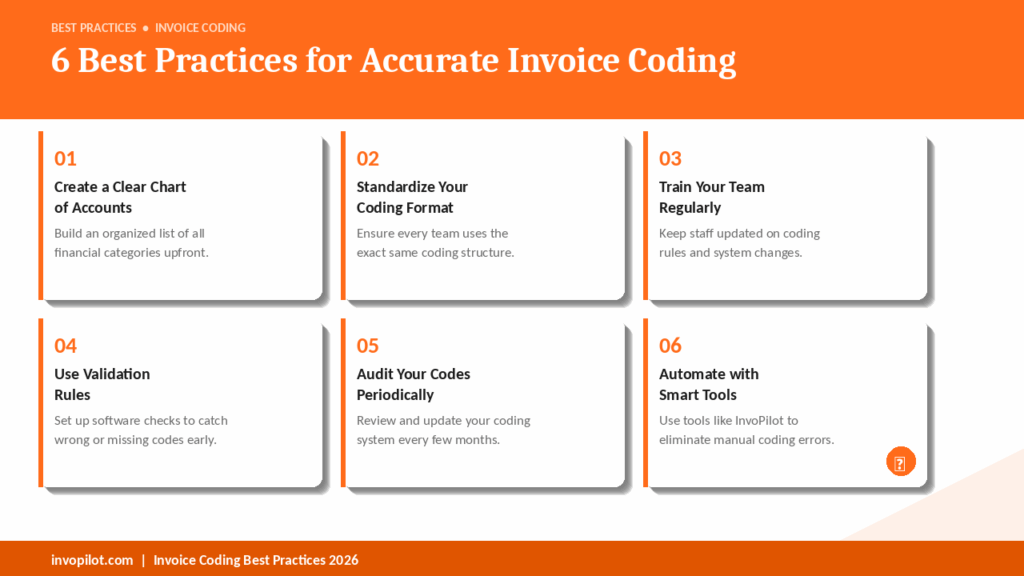
1. Create a Clear Chart of Accounts (COA)
Begin by establishing a well-organized chart of accounts. This is essentially an inventory of all the financial categories for your company — including income, expenses, assets, and liabilities. Divide them into rational subcategories such as “office materials” under “expenditures” or “advisory charges” under “revenue.” A distinct COA facilitates the accurate assignment of codes to every invoice, aiding your team in maintaining organization.
2. Standardize Your Coding Format
Ensure that all employees in your organization adhere to the same invoice coding style. For instance, if a department labels travel expenses as “EXP-101,” all other departments must adopt the same format. This uniformity minimizes confusion, prevents repetition, and enhances the accuracy of financial reporting.
3. Provide Regular Team Training
Don’t take for granted that your team is fully knowledgeable. Provide ongoing training to ensure employees are aware of the newest coding regulations, system enhancements, and software applications. Training guarantees that all employees issue invoices accurately and aids new team members in becoming proficient swiftly.
4. Use Validation Rules
Effective software can identify errors before they turn into issues. Utilize invoice management systems that automatically verify for:
- Erroneous codes
- Entries that are absent
- Repeated invoice numbers
These validation guidelines minimize mistakes and ensure your records remain tidy.
5. Audit and Review Periodically
Every few months, evaluate your coding system. Verify if certain codes are obsolete or if additional ones need to be included. This guarantees that your system remains timely and effective as time goes on.
6. Automate with Smart Tools
Coding invoices manually takes a lot of time. Automation tools such as InvoPilot can efficiently and precisely manage repetitive coding tasks. Automation also aids in maintaining compliance and minimizes the likelihood of human mistakes.
How InvoPilot Makes Invoice Coding Easier
InvoPilot is designed to streamline the complete invoice management process — particularly invoice coding. Here’s how it benefits:
Smart OCR Technology
InvoPilot employs Optical Character Recognition (OCR) to automatically gather invoice information (such as vendor name, date, amount, line items) — eliminating the need for manual entry.
Auto-Assigns Codes
It analyzes prior invoices and automatically assigns the appropriate General Ledger (GL) and cost center codes, following your business rules or historical actions.
Built-in Error Detection
InvoPilot indicators:
- Replicated invoices
- Discrepant quantities
- Questionable or absent information
This allows you to resolve problems before they affect your accounting principles.
Easy Integration
The system integrates effortlessly with your current accounting software or ERP, eliminating the need for complicated migration or data transfer.
Complete Audit Trail
All actions performed on an invoice are recorded for clarity — perfect for audits, compliance, or internal assessments.
Access from Anywhere
InvoPilot, a cloud-based solution, enables you to handle and code invoices from any device — whether it’s a laptop, desktop, or mobile — at any time and from any location.
Use our Free Invoice Generator or check out InvoPilot.com to discover ways to streamline your invoicing tasks
Final Thoughts
Though invoice coding might seem like a minor aspect of your business processes, it holds significant importance. It assists you:
- Monitor expenditures precisely
- Keep accurate financial documentation.
- Remain compliant with tax laws.
- Generate reports swiftly and assuredly.
Utilizing intelligent tools such as InvoPilot and adhering to appropriate best practices allows you to minimize mistakes, decrease manual tasks, and establish a more dependable financial workflow. It’s an easy method to conserve time, prevent expensive errors, and maintain your business’s financial health.
Create Invoices Instantly – Free & Easy!
Generate professional invoices in seconds with our Free Online Invoice Generator.
👉 Invoice Generator