
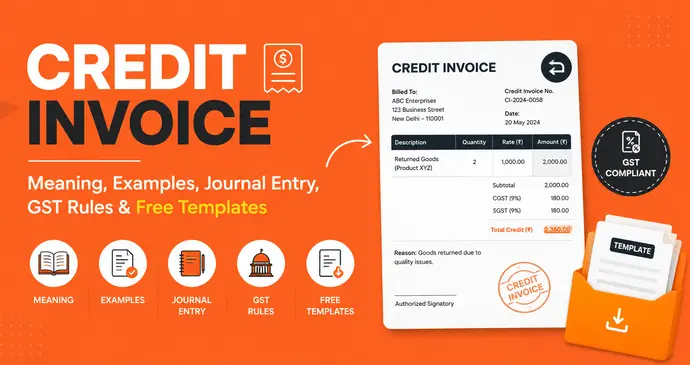
Quick answer: A credit invoice also called a credit note or credit memo. It is a document a seller issues to a buyer to reduce or cancel an amount owed on a previously issued invoice. It looks like a normal invoice but shows negative amounts, and it’s used for returns, billing errors, or discounts applied after the original invoice went out. Under GST in India, it’s a legal document governed by Section 34 of the CGST Act, and it has to reference the original invoice and be reported within a set deadline.
If you’ve ever had to walk back an invoice because a client returned a product, you overcharged them by mistake, or you promised a discount after the fact, this is the document you needed. Below, we’ll cover what a credit invoice is, walk through several real credit invoice examples, show the exact journal entries your books need, explain the GST rules and deadlines that apply in India, and settle the credit invoice vs debit invoice question once and for all.
What Is a Credit Invoice? (Meaning)
A credit invoice is a formal document a seller sends to a buyer that reduces the amount the buyer owes, or refunds money already paid. Instead of billing for goods or services like a sales invoice does, a credit invoice reverses part or all of a charge that was already billed.
You’ll typically see the term “credit invoice” used interchangeably with:
- Credit note – the more traditional accounting term, and the term used in Indian GST law
- Credit memo – common in US accounting software like QuickBooks and FreshBooks
- Sales return invoice – when it’s specifically tied to a returned product
Structurally, a credit invoice mirrors a standard tax invoice: it has an invoice number, date, buyer and seller details, line items, and a total. The key difference is that every amount is negative, and it must reference the original invoice number it’s correcting without that reference, neither party can reconcile which invoice the credit belongs to, and (as covered below) it may not even be valid for tax purposes.
Why Businesses Issue a Credit Invoice
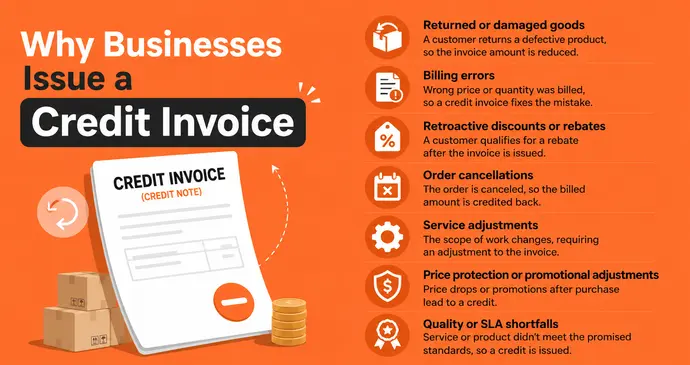
A credit invoice (credit note) gets issued whenever money owed needs to go down after the original bill was sent. The most common triggers, with a short real-world scenario for each:
- Returned or damaged goods – a customer receives 2 damaged chairs out of an order of 10 and sends them back. You issue a credit note for those 2 units only.
- Billing errors – you accidentally billed 50 units instead of 5, or applied the wrong price list to a long-standing client.
- Retroactive discounts or rebates – a client hits a quarterly volume threshold that unlocks a 10% rebate on everything they bought that quarter, but the invoices had already gone out at full price.
- Order cancellations – a client cancels part of a bulk order after the invoice was raised but before the goods shipped.
- Service adjustments – a consulting client was billed for 40 hours, but only 32 hours of work were actually delivered that sprint.
- Price protection or promotional adjustments – a price drops shortly after a customer buys, and your policy is to credit the difference.
- Quality or SLA shortfalls – a subscription or service didn’t meet an agreed service level, and a partial credit is owed as compensation.
If you’re issuing corrections often because of pricing mistakes, it’s worth reviewing your invoice coding process and how items get billed in the first place, tightening that up reduces how many credit notes you need to issue in the first place.
What Mandatory Fields A Credit Invoice Must Include
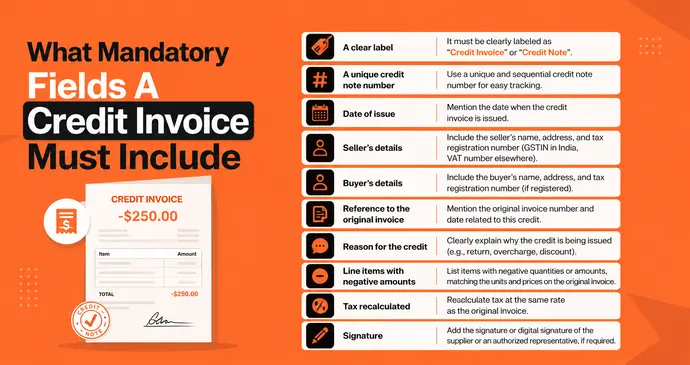
A credit invoice isn’t valid just because it has negative numbers on it. To hold up for accounting and tax purposes, it needs a specific set of fields. At minimum, every credit invoice should contain:
- A clear label – “Credit Note” or “Credit Invoice,” never just “Invoice.”
- A unique credit note number – sequential, and never reused (see numbering conventions below).
- Date of issue.
- Seller’s name, address, and tax registration number (GSTIN in India, VAT number elsewhere).
- Buyer’s name, address, and tax registration number (if registered).
- Reference to the original invoice – its number and date, without which the credit can’t be reconciled against the original charge.
- Reason for the credit – return, error, discount, cancellation, etc.
- Line items with negative quantities or negative amounts, matching the units and prices on the original invoice.
- Tax recalculated at the same rate as the original invoice.
- Signature or digital signature of the supplier or an authorized representative, where required.
Credit Invoice Numbering: Best Practices
A credit note needs its own numbering series. It don’t reuse invoice numbers or leave gaps, since tax authorities and auditors both look for continuous, traceable sequences. A few practical rules:
- Use a distinct prefix so credit notes are instantly recognizable, e.g. CN-2026-0142 instead of reusing the invoice format.
- Keep the series sequential and unique for the financial year – The serial number can run to a maximum of sixteen characters and may combine letters, numbers, and the symbols, but it must never repeat within that year.
- Never skip or delete a number, even if a credit note is cancelled. It issue a new one referencing the cancelled one instead, so the trail stays intact.
- Keep the numbering visible on both your books and the buyer’s copy, so reconciliation on either side is a five-second lookup.
Example of a Credit Invoice
Here’s what a real credit invoice looks like in practice. Say a client returned two damaged items from an invoice you sent them last month:
| Field | Detail |
|---|---|
| Credit Note No. | CN-2026-0142 |
| Date | 09 July 2026 |
| Original Invoice Ref. | INV-2026-0871 |
| Reason | Goods returned — damaged in transit |
| Line 1 | Office Chair (Model EC-410) × 2 — −₹13,000.00 |
| Line 2 | Standing Desk 140cm × 1 — −₹11,200.00 |
| Subtotal | −₹24,200.00 |
| GST (18%) | −₹4,356.00 |
| Total Credit | −₹28,556.00 |
Notice three things every credit invoice needs: negative amounts, a clear reference to the original invoice number, and a stated reason.
A second example: Retroactive Discount
A client crosses a quarterly volume threshold on 30 June, unlocking a 5% rebate on ₹4,00,000 of invoices already billed that quarter.
| Field | Detail |
|---|---|
| Credit Note No. | CN-2026-0143 |
| Date | 05 July 2026 |
| Original Invoice Refs. | INV-2026-0801 to INV-2026-0855 (Q2 2026) |
| Reason | Quarterly volume rebate — 5% per loyalty agreement dated 01 Jan 2026 |
| Subtotal | −₹20,000.00 |
| GST (18%) | −₹3,600.00 |
| Total Credit | −₹23,600.00 |
This example matters because it shows a credit note doesn’t have to tie to a single invoice since the 2019 amendments, one credit note can cover multiple invoices, or multiple credit notes can be issued against a single invoice, as long as they all belong to the same financial year.
Below are two ready-to-use, professionally designed credit invoice PDF samples you can download and adapt. One in a classic blue business layout, and one in a modern green corporate style.
Both samples show a fully worked example — including the returned-goods scenario above and a paid-invoice pricing-correction scenario — so you can see how the layout adapts to different reasons for the credit. If you’d rather build your own from scratch, InvoPilot’s free invoice generator lets you enter negative line items directly and download a clean PDF in under a minute, no signup required.
Credit Invoice vs Debit Invoice
This is one of the most confused pairs in billing. A credit invoice reduces what a buyer owes; a debit invoice (or debit note) increases it. Here’s the difference laid out clearly:
| Credit Invoice (Credit Note) | Debit Invoice (Debit Note) | |
|---|---|---|
| Effect on balance | Decreases amount owed | Increases amount owed |
| Issued by | Seller (usually) | Either buyer or seller |
| Common triggers | Returns, overbilling, discounts | Underbilling, additional charges, buyer-side purchase adjustments |
| Amount shown | Negative | Positive |
| Typical use case | Refunding or crediting a customer | Billing extra for shortfalls or added costs |
| Accounting effect | Reduces accounts receivable (seller) / accounts payable (buyer) | Increases accounts receivable (seller) / accounts payable (buyer) |
In short: if the seller undercharged, a debit invoice goes out to collect the difference. If the seller overcharged or goods came back, a credit invoice goes out to correct it.
Both documents must always reference the original invoice. This is also the core distinction covered in our guide on purchase order vs invoice, where matching documents back to their source record is equally critical.
How to Record a Credit Invoice (Journal Entry)
Recording a credit invoice correctly keeps your accounts receivable and revenue figures accurate. Here’s the standard double-entry treatment from the seller’s side, using the example above (₹28,556 total credit, ₹24,200 subtotal, ₹4,356 GST):
Seller’s journal entry (invoice still unpaid):
Dr  Sales Returns & Allowances     ₹24,200
Dr  GST/Tax Payable                ₹4,356
    Cr  Accounts Receivable                  ₹28,556
This debits the Sales Returns account (reducing net revenue) and reverses the tax liability, while crediting Accounts Receivable to reduce what the customer owes.
Buyer’s journal entry (recording the credit received):
Dr  Accounts Payable               ₹28,556
    Cr  Purchase Returns & Allowances        ₹24,200
    Cr  GST/Tax Input Credit                 ₹4,356
If the original invoice was already paid in full, the credit invoice doesn’t touch Accounts Receivable/Payable at all. Instead, the seller typically books it as:
Dr  Sales Returns & Allowances     ₹24,200
Dr  GST/Tax Payable                ₹4,356
    Cr  Cash / Customer Credit Balance       ₹28,556
and either issues a cash refund or holds the amount as an open credit balance against the customer’s next invoice. This is the same logic covered in more depth in our guide to invoice reconciliation, since an unapplied credit note is one of the most common reasons accounts receivable ledgers don’t tie out at month-end.
A quick worked example for the retroactive discount scenario above (₹23,600 credit, invoices already paid):
Dr  Sales Returns & Allowances     ₹20,000
Dr  GST/Tax Payable                ₹3,600
    Cr  Customer Credit Balance              ₹23,600
The client can then apply that ₹23,600 balance against their next order instead of waiting for a bank transfer. It is common approach for B2B rebate programs.
If you use accounting software like QuickBooks, Zoho Books, or FreshBooks, you don’t need to post these entries manually. Most platforms let you generate a credit note directly against the original invoice and will automatically offset your accounts receivable balance and adjust your tax reporting.
Credit Note Rules Under GST (India): Time Limits & Reporting
Because a credit note changes your tax liability, GST law in India puts real structure around it. A few things every Indian business (and every accountant filing on their behalf) needs to know:
- There’s technically no deadline to issue a credit note commercially – A supplier can issue one whenever the situation arises but there is a hard deadline to report it in your GST returns if you want it to reduce your output tax liability.
- The reporting deadline – A credit note must be declared in your GST returns by 30th November of the financial year following the one the original invoice belongs to, or the actual date you file your annual return (GSTR-9) whichever comes earlier.
- Miss that window, and the GST benefit is gone for good – You can still issue a commercial credit note to settle the account with your customer after the deadline, but it will carry no GST and won’t reduce your output tax liability which means the tax you already paid on the original, now-reversed amount becomes a real cost to your business.
- The recipient’s input tax credit (ITC) has to be reversed too – Since a 2025 amendment, the supplier’s reduction in output tax only goes through once the buyer accepts the credit note and reverses the corresponding ITC in the GST Invoice Management System (IMS) so a credit note issued in isolation, without the buyer’s side reconciling it, won’t actually lower your tax bill.
- Only the supplier can issue a GST-effective credit note – A buyer can raise a debit note to flag a return in their own books, but the tax adjustment itself only happens once the supplier issues and reports the matching credit note.
- Reporting flow – the credit note gets reported by the supplier in GSTR-1, flows through automatically to the recipient’s GSTR-2B, and both sides then adjust GSTR-3B. The supplier lowers output tax, the recipient lowers their claimed ITC.
Practical takeaway: Don’t sit on credit notes. Even though the “no deadline to issue” rule sounds generous, the reporting cutoff means any credit note tied to last financial year’s invoices needs to be in your books and reported well before that year’s 30 November deadline, otherwise you’re paying tax on revenue you never actually kept.
Common Mistakes to Avoid When Issuing a Credit Invoice
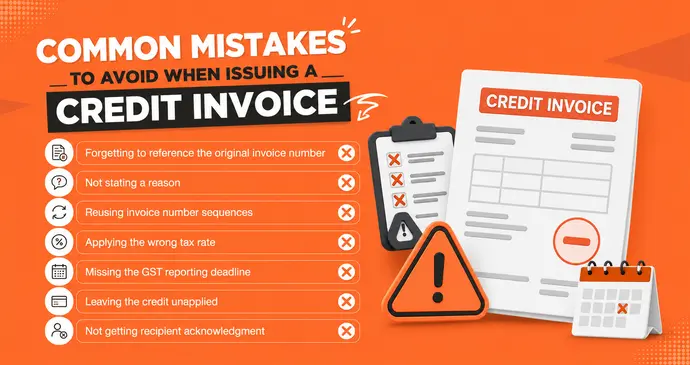
- Forgetting to reference the original invoice number – This single omission is the most common reason credit notes get rejected in audits or bounced back for correction.
- Not stating a reason – Auditors and modern accounting platforms both expect a clear reason field — “adjustment” isn’t specific enough.
- Reusing invoice number sequences – Credit notes need their own numbering series, not a reused or overlapping one.
- Applying the wrong tax rate – The credit must reverse tax at the same rate that applied on the original invoice, even if your current rate has since changed.
- Missing the GST reporting deadline – As covered above, this permanently forfeits the tax adjustment even though the commercial credit is still valid.
- Leaving the credit unapplied – An open credit balance that never gets matched to a future invoice or refunded is one of the most common causes of accounts receivable not tying out at month-end.
- Not getting recipient acknowledgment – Especially post-2025, unreconciled ITC reversal on the buyer’s side can block the supplier’s tax benefit entirely.
Is a Credit Invoice a Refund?
Not automatically. A credit invoice is not the same thing as a refund, though it can lead to one. A credit invoice simply documents that the seller owes the buyer a reduction in what’s due. What happens next depends on whether the original invoice was paid:
- If unpaid – The credit note reduces the outstanding balance. No cash changes hands.
- If already paid – The seller either issues an actual cash refund, or holds the credit as a balance to apply toward the buyer’s next invoice.
So a credit invoice is the paperwork; a refund is one possible outcome of it. This distinction matters for cash flow forecasting. It is worth keeping in mind alongside our breakdown of invoice payment terms, since unresolved credit balances can distort how much cash you’re actually expecting to collect.
Credit Note vs Credit Invoice – Is There a Difference?
No, in everyday use, credit note and credit invoice describe the exact same document. “Credit note” is the more traditional accounting term used globally (especially in the UK, EU, and India for GST purposes), while “credit invoice” is more common in general business writing and US-based software like FreshBooks or Wave. Some businesses also use “credit memo” interchangeably. Whichever term your accounting system uses, the format and function are identical: a negative-value invoice referencing an original charge.
How to Create a Credit Invoice in Minutes
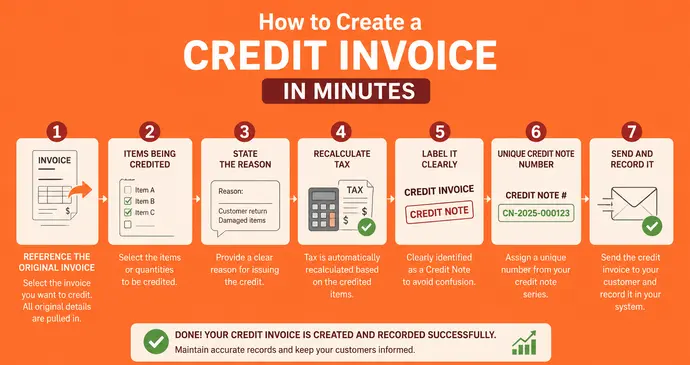
- Reference the original invoice – pull up the invoice number, date, and line items being corrected.
- List the items being credited – with negative quantities or negative amounts, matching the units/prices originally billed.
- State the reason – returned goods, billing error, discount, or cancellation. This isn’t optional; auditors and accounting platforms both expect it.
- Recalculate tax – GST/VAT must be reversed proportionally, same rate as the original invoice.
- Label it clearly – “Credit Note” or “Credit Invoice,” never just “Invoice,” to avoid confusing your accounts receivable.
- Assign it a unique number from its own credit note series – never reuse or skip numbers.
- Send and record it – deliver the PDF to the buyer, post the journal entry, and if it’s GST-relevant, report it in your next GSTR-1 well ahead of the annual deadline.
You can build one from scratch. Just enter your line items as negative amounts, add a note referencing the original invoice, and download the PDF instantly. If you’d rather start from a ready-made layout, browse our full library of invoice templates, which you can adapt into a credit note in Google Docs or Word.