
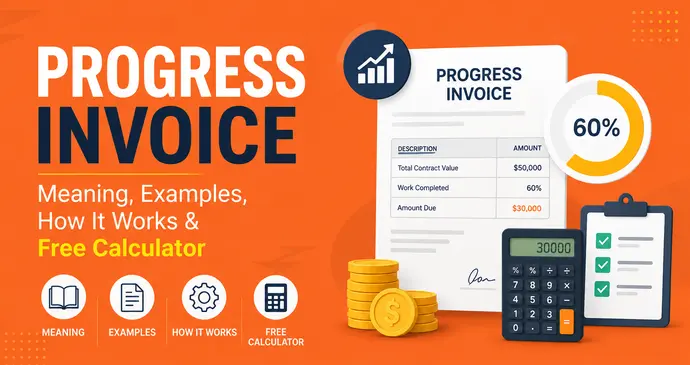
Quick answer: A progress invoice is a bill sent for a portion of a larger project’s total cost, issued as work is completed rather than all at once at the end. Instead of waiting weeks or months to get paid for a big job, you invoice in stages by percentage complete, by milestone, or by phase. So you get paid as you go. Contractors, agencies, consultants, and software teams use progress invoicing (also called progress billing) on any project long enough that fronting the full cost would hurt cash flow.
If you just need to create one right now, you can generate a free progress invoice with Invoice Generator in under two minutes. Otherwise, keep reading: this guide covers the full meaning of progress invoicing, real examples in PDF, what to include, and how to set it up correctly.
What Is a Progress Invoice?
A progress invoice is a partial bill issued during the life of a project, tied to the amount of work actually completed at that point in time. Rather than a single invoice at project close, the total contract value is split across multiple invoices, each corresponding to a phase, milestone, or percentage of completion.
Progress invoices are almost always tied back to an original estimate, quote, or contract so both sides can see, at a glance, what’s been billed, what’s been paid, and what’s left. This is different from a standard one-time invoice, which bills for a completed sale or service in a single shot.
You’ll see progress invoicing most often in industries where projects run for weeks or months:
- Construction and renovation contracting
- Architecture and engineering firms
- Web design, software, and app development
- Marketing and creative agencies
- Manufacturing of custom or large-scale equipment
- Consulting and professional services with multi-phase engagements
Why Progress Invoice Exists?
The core idea behind progress invoice meaning is simple: cash flow matches work performed. On a $50,000 renovation that takes four months, a contractor can’t realistically pay for materials, labor, and subcontractors for four months and only get paid at the very end. Progress invoicing solves this by letting the contractor bill for each phase as it’s finished demolition, framing, electrical, finishes, so money keeps moving in both directions throughout the project.
For the client, it means never having to pay one enormous lump sum, and it means only paying for work that’s actually been delivered and verified. That’s the trade-off progress billing is built around: steady cash flow for the service provider, manageable and transparent payments for the client.
How Progress Invoicing Works?
Progress invoicing generally follows four steps:
- Create an estimate or quote. Before work starts, both parties agree on the full scope, the total contract value, and how it will be broken into billing stages — by percentage (25%, 50%, 75%, 100%) or by defined milestones (e.g., “foundation complete,” “framing complete”).
- Complete a phase or milestone. As work reaches an agreed checkpoint, the biller documents what was finished.
- Issue the progress invoice. A new invoice is generated for that specific portion — showing the value of the completed phase, what’s been billed previously, and what remains on the contract.
- Track against the original contract. Every progress invoice should reconcile back to the master estimate, so nothing is double-billed and both sides can see the running total at any point.
This cycle repeats until 100% of the contract value has been invoiced. You can build this manually in a spreadsheet, but it’s far easier and far less error-prone with an online invoice generator that keeps a running total for you.
Try It: Progress Invoice Calculator
Enter a contract value, percentage complete, prior billings, and retainage rate below to see exactly what’s due on this invoice — the same math a G702 walks through line by line.
Progress Invoice Calculator
Progress Invoice Calculator
Works like a G702 — line by line
Same math as AIA G702 lines 4–9. Retainage is calculated on work completed this period, not the full contract — verify your state’s retainage cap and release rules before finalizing.
Progress Invoice Example
Numbers make this much easier to understand. Here are two real-world progress invoice examples.
Example 1: Construction Progress Invoice (Milestone-Based)
A contractor has a $185,000 renovation contract split into four milestones. After completing the “Structural & Framing” phase (25% of the contract), they issue this progress invoice:
| Milestone | Phase Value | % Complete | Billed to Date | This Invoice |
|---|---|---|---|---|
| 1. Site Prep & Demolition | $27,750 | 100% | $27,750 | $0.00 (billed prior) |
| 2. Structural & Framing | $46,250 | 100% | $46,250 | $46,250.00 |
| 3. Electrical, Plumbing & HVAC | $64,750 | 0% | $0.00 | $0.00 |
| 4. Finishes & Final Walkthrough | $46,250 | 0% | $0.00 | $0.00 |
After a 10% retainage holdback (common in construction contracts), the total due on this invoice is $41,625.00 — even though the full contract is worth $185,000.
Example 2: Design Agency Progress Invoice (Percentage-of-Completion)
A design studio has an $18,000 project fee for an e-commerce website redesign, billed in four phases (Discovery 20%, Design 30%, Development 35%, QA & Launch 15%). After finishing the UI Design phase, the project is 65% complete overall, and the studio invoices:
| Deliverable | Allocated Value | Progress | This Invoice |
|---|---|---|---|
| Discovery & UX Research | $3,600 | 100% | Billed prior |
| UI Design — All Templates | $5,400 | 100% | $5,400.00 |
| Front-End Development | $6,300 | 0% | $0.00 |
| QA, Launch & Handover | $2,700 | 0% | $0.00 |
Total due on this invoice: $5,400.00, with $6,300 remaining once development is complete.
What to Include in a Progress Invoice
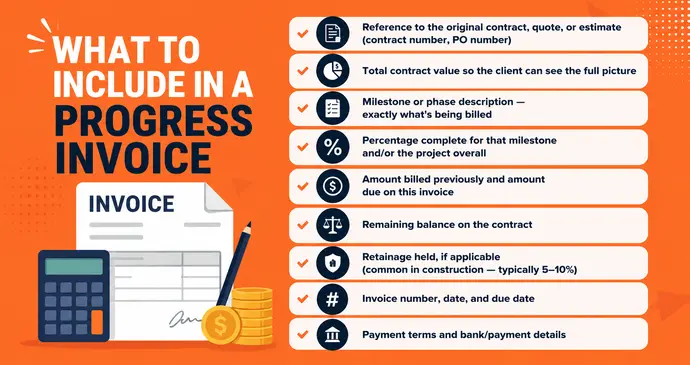
A well-built progress invoice needs more information than a standard invoice because it has to show context where this bill fits inside the whole project. At minimum, include:
- Reference to the original contract, quote, or estimate (contract number, PO number)
- Total contract value so the client can see the full picture
- Milestone or phase description — exactly what’s being billed
- Percentage complete for that milestone and/or the project overall
- Amount billed previously and amount due on this invoice
- Remaining balance on the contract
- Retainage held, if applicable (common in construction — typically 5–10%)
- Invoice number, date, and due date
- Payment terms and bank/payment details
Missing any of these is one of the fastest ways to trigger client disputes on a long-running project. The client should never have to ask “wait, how much of this have I already paid?”
Progress Invoicing vs. Other Invoice Types
It’s easy to confuse progress invoicing with a few related billing methods. Here’s the quick distinction:
- Progress invoice vs. interim invoice – These terms are often used interchangeably. Both bill for partial work during a long project — “interim invoice” is more common in the UK/EU, “progress invoice” or “progress billing” in the US.
- Progress invoice vs. recurring invoice – A recurring invoice bills the same fixed amount on a set schedule (e.g., monthly retainer). A progress invoice bills variable amounts tied to actual work completed.
- Progress invoice vs. deposit invoice – A deposit invoice bills a portion before work begins. Progress invoices bill after a portion of work is done.
- Progress invoice vs. sales invoice – A standard sales invoice bills the full amount for a completed, one-time sale or service.
- Progress invoice vs. final invoice – The final invoice is the last progress invoice — it closes out the contract, bills the remaining balance, and often releases any retainage held.
If you’re also comparing progress invoices to the source document they’re built from, see our guide on purchase orders vs invoices for how POs and contracts tie into the billing process.
Benefits of Progress Invoicing
- Accelerated, predictable cash flow – you’re not fronting months of labor and materials before getting paid.
- Lower financial risk – if a project stalls or a client disputes work, you’ve already been paid for completed phases.
- No “sticker shock” for clients – a $185,000 project becomes four manageable payments instead of one intimidating lump sum.
- Built-in transparency – both sides can see exactly what’s been billed, what’s been paid, and what’s left at any moment.
- Easier budgeting for clients, who can plan cash outflows around each milestone rather than a single large payment.
How to Create a Progress Invoice
You have three options:
- Spreadsheet – works for very simple, single-client setups, but tracking billed-to-date vs. contract value manually gets error-prone fast.
- Accounting software – platforms like NetSuite or Zoho Books let you link invoices to the original quote and auto-track percentages, useful at enterprise scale.
- A dedicated invoice generator – for freelancers, contractors, and small agencies who want a polished, professional PDF without the overhead of a full accounting suite.
With InvoPilot’s free invoice generator, you can build a progress invoice in minutes:
- Add your business details, client details, and reference the original estimate or contract number.
- List the milestone or phase you’re billing, along with its value and percentage complete.
- Add notes specifying total contract value, amount billed to date, and remaining balance so the client has full context.
- Set your currency, tax, and payment terms, InvoPilot supports GST/VAT fields if applicable.
- Download the finished invoice as a polished, print-ready PDF instantly.
If you’d rather start from a ready-made layout, browse our free invoice templates, or if you’re billing a client before a project even starts, check out the proforma invoice generator and quote generator to formalize the estimate first. For projects with a formal scope document, our SOW generator can help define milestones before you start invoicing against them.